# Java

介绍java 相关技术

# java 内存布局

java 内存布局及对对象相关信息

# 内存布局

1. #### <span style="color: #000000;">***内存布局概况***</span>
    
    
    1. ![image-1655038159720.png](http://wiki.shopqorg.com/uploads/images/gallery/2022-06/scaled-1680-/image-1655038159720.png)
    2. 其中 markword 占用 8个字节
    3. 类型指针占用4个字节
    4. 实例数据 所占用的字节根据类成员变量所占用的字节来确定
    5. 对齐 ：类所占用的内存必须8的倍数
    6. 由此得知一个没有成员变量的类占用16字节 因为还要对齐 所以 8 + 4 + 4 = 16
    7. 打印内存布局可以使用依赖库 JOL
2. #### ***markword 主要包含哪些信息？***
    
    
    1. hashcode
    2. 锁信息
    3. GC 信息

# 对象定位

[![image-1655039710650.png](http://wiki.shopqorg.com/uploads/images/gallery/2022-06/scaled-1680-/image-1655039710650.png)](http://wiki.shopqorg.com/uploads/images/gallery/2022-06/image-1655039710650.png)

# 对象怎么分配

# java 数据结构介绍

主要介绍 JAVA 基本数据结构

# ArrayList 与LinkList异同

[![image-1655040518452.png](http://wiki.shopqorg.com/uploads/images/gallery/2022-06/scaled-1680-/image-1655040518452.png)](http://wiki.shopqorg.com/uploads/images/gallery/2022-06/image-1655040518452.png)

[![image-1655040581521.png](http://wiki.shopqorg.com/uploads/images/gallery/2022-06/scaled-1680-/image-1655040581521.png)](http://wiki.shopqorg.com/uploads/images/gallery/2022-06/image-1655040581521.png)

# 接口与抽象类的区别

[![image-1655041774336.png](http://wiki.shopqorg.com/uploads/images/gallery/2022-06/scaled-1680-/image-1655041774336.png)](http://wiki.shopqorg.com/uploads/images/gallery/2022-06/image-1655041774336.png)

# 一些方法的使用

方法使用

# hashcode 与 equals 如何使用

[![image-1655042059967.png](http://wiki.shopqorg.com/uploads/images/gallery/2022-06/scaled-1680-/image-1655042059967.png)](http://wiki.shopqorg.com/uploads/images/gallery/2022-06/image-1655042059967.png)

# spring

介绍spring 相关技术

# spring 事务传播机制

[![image-1655043375726.png](http://wiki.shopqorg.com/uploads/images/gallery/2022-06/scaled-1680-/image-1655043375726.png)](http://wiki.shopqorg.com/uploads/images/gallery/2022-06/image-1655043375726.png)

[![image-1655043612220.png](http://wiki.shopqorg.com/uploads/images/gallery/2022-06/scaled-1680-/image-1655043612220.png)](http://wiki.shopqorg.com/uploads/images/gallery/2022-06/image-1655043612220.png)

# bean 是线程安全的吗

[![image-1655043704050.png](http://wiki.shopqorg.com/uploads/images/gallery/2022-06/scaled-1680-/image-1655043704050.png)](http://wiki.shopqorg.com/uploads/images/gallery/2022-06/image-1655043704050.png)

# spring 设计模式

[![image-1655044047229.png](http://wiki.shopqorg.com/uploads/images/gallery/2022-06/scaled-1680-/image-1655044047229.png)](http://wiki.shopqorg.com/uploads/images/gallery/2022-06/image-1655044047229.png)

# 为什么重写equals方法，一定要重写hashcode方法？

[![image-1655085071947.png](http://wiki.shopqorg.com/uploads/images/gallery/2022-06/scaled-1680-/image-1655085071947.png)](http://wiki.shopqorg.com/uploads/images/gallery/2022-06/image-1655085071947.png)

# Java线程池的拒绝策略有哪些？

[![image-1655086428398.png](http://wiki.shopqorg.com/uploads/images/gallery/2022-06/scaled-1680-/image-1655086428398.png)](http://wiki.shopqorg.com/uploads/images/gallery/2022-06/image-1655086428398.png)

[![image-1655086589619.png](http://wiki.shopqorg.com/uploads/images/gallery/2022-06/scaled-1680-/image-1655086589619.png)](http://wiki.shopqorg.com/uploads/images/gallery/2022-06/image-1655086589619.png)

# mybatis 自动生成实体命令

**mvn mybatis-generator:generate**

# cmd 多 jar 启动

java -D loader.path=./ -jar .\\manager-foreign-edition-0.0.1-SNAPSHOT.jar

# arthas

工具使用介绍

# dashboard

[![image-1660875782081.png](http://wiki.shopqorg.com/uploads/images/gallery/2022-08/scaled-1680-/image-1660875782081.png)](http://wiki.shopqorg.com/uploads/images/gallery/2022-08/image-1660875782081.png)

数据说明：

ID：java级别的线程id，注意这个id不能跟jstack中的nativeID一一对应  
NAME：线程名  
GROUP：线程组名  
PRIORITY：线程优先级，1 ~ 10 之间的数字，越大表示优先级越高  
STATE：线程的状态  
CPU%：线程的cpu使用率。比如采样间隔1000ms，某个线程的增量cpu时间为100ms，则cpu使用率=100/1000=10%  
DELTA\_TIME：上次采样之后线程运行增量cpu时间，数据格式为（秒）  
TIME：线程运行总cpu时间，数据格式为（分:秒）  
INTERRUPTED：线程当前的中断位状态  
DAEMON：是否是（守护）线程  
内存信息

heap：

heap：堆。

ps\_eden\_space：堆内存中新生代的Eden区。

 ps\_eden\_space：堆内存中的survivor区。

ps\_old\_gen：堆内存的老年代区。

noheap：堆内存之外。

code\_cache：JVM在运行时会频繁的调用方法的字节码编译为机器码，这部分代码所占的空间就是code\_cache。

metaspace：元数据区。jdk1.8之后将原来堆内存中的方法去转移到了堆外面叫元数据区了。

compressed\_class\_space：类文件信息区。

  
GC信息：

ps\_scavenge.count：垃圾回收次数  
ps\_scavenge.time(ms)：垃圾回收消耗时间  
ps\_marksweep.count：标记-清除算法的次数  
ps\_marksweep.time(ms)：清除算法的消耗时间

# centos 切换 java 版本

 update-alternatives --config java

# jvm

介绍jvm 技术

# 新页面

**<span class="bjh-h3">字节码指令</span>**

<span class="bjh-ul"><span class="bjh-li"><span class="bjh-p">Java虚拟机的指令由一个字节长度的，代表某种特定操作含义的数字，称之为操作码，以及跟随其后的零至多个代表此操作所需参数的操作数而构成。</span></span><span class="bjh-li"><span class="bjh-p">操作码的长度为1个字节，因此最大只有256个。</span></span><span class="bjh-li"><span class="bjh-p">基于栈的指令集架构</span></span></span><span class="bjh-h3">加载和存储指令</span>

<span class="bjh-ul"><span class="bjh-li"><span class="bjh-p">加载和存储指令用于将数据在栈帧中的局部变量表和操作数栈之间来回传输。</span></span><span class="bjh-li"><span class="bjh-p">将一个局部变量加载到操作栈：iload、iload\_&lt;n&gt;、lload、lload\_&lt;n&gt;、fload、fload\_&lt;n&gt;、dload、dload\_&lt;n&gt;、aload、aload\_&lt;n&gt;。</span></span><span class="bjh-li"><span class="bjh-p">将一个数值从操作数栈存储到局部变量表：istore、istore\_&lt;n&gt;、lstore、lstore\_&lt;n&gt;、fstore、fstore\_&lt;n&gt;、dstore、dstore\_&lt;n&gt;、astore、astore\_&lt;n&gt;。</span></span><span class="bjh-li"><span class="bjh-p">将一个变量加载到操作数栈：bipush、sipush、ldc、ldc\_w、ldc2\_w、aconst\_null、iconst\_m1、iconst\_&lt;i&gt;、lconst\_&lt;l&gt;、fconst\_&lt;f&gt;、dconst\_&lt;d&gt;。</span></span><span class="bjh-li"><span class="bjh-p">扩充局部变量表的访问索引的指令：wide</span></span><span class="bjh-li"><span class="bjh-p">\_&lt;n&gt;都是某个带有一个操作数的通用指令的特殊形式，它们省略了显示的操作数，不需要进行取操作数的动作，因为实际上操作数就隐含在指令中。</span></span></span><span class="bjh-h3">运算指令</span>

<span class="bjh-ul"><span class="bjh-li"><span class="bjh-p">用于对两个操作数栈上的值进行某种特定运算，并把结构重新存入到操作栈顶。</span></span><span class="bjh-li"><span class="bjh-p">加法指令：iadd、ladd、fadd、dadd</span></span><span class="bjh-li"><span class="bjh-p">减法指令：isub、lsub、fsub、dsub</span></span><span class="bjh-li"><span class="bjh-p">乘法指令：imul、lmul、fmul、dmul</span></span><span class="bjh-li"><span class="bjh-p">除法指令：idiv、ldiv、fdiv、ddiv</span></span><span class="bjh-li"><span class="bjh-p">求余指令：irem、lrem、frem、drem</span></span><span class="bjh-li"><span class="bjh-p">取反指令：ineg、lneg、fneg、dneg</span></span><span class="bjh-li"><span class="bjh-p">位移指令：ishl、ishr、iushr、lshl、lshr、lushr</span></span><span class="bjh-li"><span class="bjh-p">按位或指令：ior、lor</span></span><span class="bjh-li"><span class="bjh-p">按位与指令：iand、land</span></span><span class="bjh-li"><span class="bjh-p">按位异或指令：ixor、lxor</span></span><span class="bjh-li"><span class="bjh-p">局部变量自增指令：iinc</span></span><span class="bjh-li"><span class="bjh-p">比较指令：dcmpg、dcmpl、fcmpg、fcmpl、lcmp</span></span></span><span class="bjh-h3">类型转换指令</span>

<span class="bjh-ul"><span class="bjh-li"><span class="bjh-p">类型转换指令可以将两种不同的数值类型相互转换。</span></span><span class="bjh-li"><span class="bjh-p">宽化类型转换：</span></span></span><span class="bjh-ul"><span class="bjh-li"><span class="bjh-p">int类型到long、float或者doule类型</span></span><span class="bjh-li"><span class="bjh-p">long类型到float、double</span></span><span class="bjh-li"><span class="bjh-p">float类型到double</span></span></span><span class="bjh-ul"><span class="bjh-li"><span class="bjh-p">窄化类型转换：i2b、i2c、i2s、l2i、f2i、f2l、d2i、d2l、d2f。</span></span></span><span class="bjh-h3">对象创建与访问指令</span>

<span class="bjh-ul"><span class="bjh-li"><span class="bjh-p">创建类实例指令：</span></span></span>

<span class="bjh-ul"><span class="bjh-li"><span class="bjh-p">new</span></span><span class="bjh-li"><span class="bjh-p">创建数组指令：newarray、anewarray、multianewarray</span></span><span class="bjh-li"><span class="bjh-p">访问类字段（类变量）和实例字段（实例变量）指令：getfield、putfield、getstatic、putstatic</span></span><span class="bjh-li"><span class="bjh-p">把一个数组元素加载到操作数栈指令：baload、caload、saload、iaload、laload、faload、daload、aaload</span></span><span class="bjh-li"><span class="bjh-p">将一个操作数栈的值储存到数组元素中指令：bastore、castore、sastore、iastore、fastore、dastore、aastore</span></span><span class="bjh-li"><span class="bjh-p">取数组长度的指令：arraylength</span></span><span class="bjh-li"><span class="bjh-p">检查类实例类型指令：instanceof、checkcast</span></span></span><span class="bjh-h3">操作数栈管理指令</span>

<span class="bjh-ul"><span class="bjh-li"><span class="bjh-p">将操作数栈的栈顶一个或两个元素出栈：pop、pop2</span></span><span class="bjh-li"><span class="bjh-p">复制栈顶一个或两个数值并将复制值或双份的复制值重新压入栈顶：dup、dup2、dup\_x1、dup2\_x1、dup\_x2、dup2\_x2</span></span><span class="bjh-li"><span class="bjh-p">将栈最顶端的两个数值互换：swap</span></span></span><span class="bjh-h3">控制转义指令</span>

<span class="bjh-ul"><span class="bjh-li"><span class="bjh-p">条件分支：ifeq、iflt、ifle、ifne、ifgt、ifge、ifnull、ifnonnull、if\_icmpeq、if\_icmpne、if\_icmplt、if\_icmpgt、if\_icmple、if\_icmpge、if\_acmpeq、if\_acmpne</span></span><span class="bjh-li"><span class="bjh-p">复合条件分支：tableswitch、lookupswitch</span></span><span class="bjh-li"><span class="bjh-p">无条件分支：goto、goto\_w、jsr、jsr\_w、ret</span></span></span><span class="bjh-h3">方法调用和返回指令</span>

<span class="bjh-ul"><span class="bjh-li"><span class="bjh-p">invokevirtual指令：用于调用对象的实例方法，根据对象的实际类型进行分派。</span></span><span class="bjh-li"><span class="bjh-p">invokeinterface指令：用于调用接口方法，它会在运行时搜索一个实现了这个接口方法的对象，找出适合的方法进行调用。</span></span><span class="bjh-li"><span class="bjh-p">invokespecial指令：用于调用一些需要特殊处理的实例方法，包括实例初始化方法、私有方法和分类方法</span></span><span class="bjh-li"><span class="bjh-p">invokestatic指令：用于调用类静态方法</span></span><span class="bjh-li"><span class="bjh-p">invokedynamic指令：用于在运行时动态解析出调用点限定符所引用的方法。</span></span></span><span class="bjh-h3">异常处理指令</span>

<span class="bjh-ul"><span class="bjh-li"><span class="bjh-p">athrow</span></span></span><span class="bjh-h3">同步指令</span>

<span class="bjh-ul"><span class="bjh-li"><span class="bjh-p">方法级的同步：隐式的，无须通过字节码指令控制，它实现在方法调用和返回操作之中。（方法访问标识ACC\_SYNCHRONIZED）</span></span><span class="bjh-li"><span class="bjh-p">代码块的同步：</span></span></span><span class="bjh-ul"><span class="bjh-li"><span class="bjh-p">monitorenter</span></span><span class="bjh-li"><span class="bjh-p">monitorexit</span></span></span>

# spring-boot 2.7 更新记录

# <span>Spring Boot 2.7 发行说明</span>

<div class="mt-2 mt-md-1 pb-3 gh-header-meta" id="bkmrk-%E5%AE%89%E8%BF%AA%C2%B7%E5%A8%81%E5%B0%94%E9%87%91%E6%A3%AE%E7%BC%96%E8%BE%91%E4%BA%86%E6%AD%A4%E9%A1%B5%E9%9D%A21%E6%9C%8820%E6%97%A5%C2%A0%C2%B7"><span>安迪·威尔金森编辑了此页面</span><span>1月20日</span><span> · </span>[<span>33 次修订</span>](https://github.com/spring-projects/spring-boot/wiki/Spring-Boot-2.7-Release-Notes/_history)</div>### <svg aria-hidden="true" class="octicon octicon-triangle-right js-wiki-sidebar-toggle-display" data-view-component="true" height="16" version="1.1" viewbox="0 0 16 16" width="16"></svg><span> 页数</span><span class="Counter Counter--primary" data-view-component="true" title="196"><span>196</span></span>

# <span>页数</span>

[**<span>家</span>**](https://github.com/spring-projects/spring-boot/wiki)

[**<span>支持的版本</span>**](https://github.com/spring-projects/spring-boot/wiki/Supported-Versions)

## <span>发行说明</span>

[**<span>v3.1</span>**](https://github.com/spring-projects/spring-boot/wiki/Spring-Boot-3.1-Release-Notes)

[**<span>v3.0</span>**](https://github.com/spring-projects/spring-boot/wiki/Spring-Boot-3.0-Release-Notes)

[**<span>v2.7</span>**](https://github.com/spring-projects/spring-boot/wiki/Spring-Boot-2.7-Release-Notes)

[**<span>旧版本</span>**](https://github.com/spring-projects/spring-boot/wiki/Spring-Boot-Older-Release-Notes)

## <span>迁移指南</span>

[**<span>v2.7 → v3.0</span>**](https://github.com/spring-projects/spring-boot/wiki/Spring-Boot-3.0-Migration-Guide)

[**<span>v2.4+ 配置数据</span>**](https://github.com/spring-projects/spring-boot/wiki/Spring-Boot-Config-Data-Migration-Guide)

[**<span>v1.5 → v2.0</span>**](https://github.com/spring-projects/spring-boot/wiki/Spring-Boot-2.0-Migration-Guide)

## <span>帮助</span>

[**<span>配置绑定</span>**](https://github.com/spring-projects/spring-boot/wiki/Spring-Boot-Configuration-Binding)

[**<span>IDE 绑定功能</span>**](https://github.com/spring-projects/spring-boot/wiki/IDE-binding-features)

[**<span>基于 Spring Boot 构建</span>**](https://github.com/spring-projects/spring-boot/wiki/Building-On-Spring-Boot)

[**<span>使用 GraalVM 进行 Spring Boot</span>**](https://github.com/spring-projects/spring-boot/wiki/Spring-Boot-with-GraalVM)

## <span>开发流程</span>

[**<span>使用代码</span>**](https://github.com/spring-projects/spring-boot/wiki/Working-with-the-Code)

[**<span>团队实践</span>**](https://github.com/spring-projects/spring-boot/wiki/Team-Practices)

[**<span>使用 Git 分支</span>**](https://github.com/spring-projects/spring-boot/wiki/Working-with-Git-branches)

[**<span>合并拉取请求</span>**](https://github.com/spring-projects/spring-boot/wiki/Merging-Pull-Requests)

[**<span>有用的 Git 别名</span>**](https://github.com/spring-projects/spring-boot/wiki/Useful-git-aliases)

[**<span>GitHub 问题</span>**](https://github.com/spring-projects/spring-boot/wiki/GitHub-Issues)

[**<span>Maven POM 文件</span>**](https://github.com/spring-projects/spring-boot/wiki/Maven-POM-Files)

[**<span>性能调优</span>**](https://github.com/spring-projects/spring-boot/wiki/Performance-Tuning)

[**<span>生成 SSL 密钥库</span>**](https://github.com/spring-projects/spring-boot/wiki/Generating-SSL-KeyStores)

[**<span>弃用</span>**](https://github.com/spring-projects/spring-boot/wiki/Deprecations)

[**<span>创建新的维护分支</span>**](https://github.com/spring-projects/spring-boot/wiki/Creating-A-New-Maintenance-Branch)

##### <span>在本地克隆此 wiki</span>

<div class="mt-4" id="bkmrk-"><div class="mt-4"><div class="Layout Layout--flowRow-until-md Layout--sidebarPosition-end Layout--sidebarPosition-flowRow-end" data-view-component="true"><div class="Layout-sidebar" data-view-component="true"><div class="wiki-rightbar"><div class="width-full input-group"><svg aria-hidden="true" class="octicon octicon-copy" data-view-component="true" height="16" version="1.1" viewbox="0 0 16 16" width="16"></svg></div></div></div><div class="Layout-main" data-view-component="true"><div class="gollum-asciidoc-content"><div class="markdown-body">  
</div></div></div></div></div></div># <svg aria-hidden="true" class="octicon octicon-link" height="16" version="1.1" viewbox="0 0 16 16" width="16"></svg><span>Spring Boot 2.7 发行说明</span>

## <svg aria-hidden="true" class="octicon octicon-link" height="16" version="1.1" viewbox="0 0 16 16" width="16"></svg><span>从 Spring Boot 2.6 升级</span>

### <svg aria-hidden="true" class="octicon octicon-link" height="16" version="1.1" viewbox="0 0 16 16" width="16"></svg><span>@SpringBootTest 属性源优先级</span>

`@SpringBootTest`<span>使用属性</span>`properties`<span>或注释添加的测试属性源</span>`@TestPropertySource`<span>现在添加到命令行属性源上方。</span>`@SpringBootTest`<span>如果您遇到了同时使用</span>`properties`<span>and （并且具有相同属性名称）的情况</span>`args`<span>，您可能需要进行更改。</span>

### <svg aria-hidden="true" class="octicon octicon-link" height="16" version="1.1" viewbox="0 0 16 16" width="16"></svg><span>新的飞行路线模块</span>

<span>Spring Boot 2.7 升级到 Flyway 8.5（从 8.0）。自8.0版本以来，Flyway对多种数据库的支持被提取到新的模块中：</span>

<div class="mt-4" id="bkmrk-flyway-firebird%EF%BC%88%E7%81%AB%E9%B8%9F%EF%BC%89-"><div class="mt-4"><div class="Layout Layout--flowRow-until-md Layout--sidebarPosition-end Layout--sidebarPosition-flowRow-end" data-view-component="true"><div class="Layout-main" data-view-component="true"><div class="gollum-asciidoc-content"><div class="markdown-body"><div><div><div><div>  
</div><div>- `flyway-firebird`<span>（火鸟）</span>
- `flyway-mysql`<span>（MariaDB 和 MySQL）</span>
- `flyway-sqlserver`<span>（SQL 服务器）</span>

</div><div>  
</div></div></div></div></div></div></div></div></div></div><span>如果您使用 Flyway 管理上述数据库之一的架构，请添加对相应新模块的依赖项。</span>

### <svg aria-hidden="true" class="octicon octicon-link" height="16" version="1.1" viewbox="0 0 16 16" width="16"></svg><span>H2 2.1</span>

<span>Spring Boot 2.7 已升级至 H2 2.1.120。H2 2.x 向后不兼容，并修复了许多安全漏洞。有关更改的详细信息以及如何处理升级，请参阅</span>[<span>H2 更改日志</span>](http://www.h2database.com/html/changelog.html)<span>和</span>[<span>迁移指南。</span>](http://www.h2database.com/html/migration-to-v2.html)

#### <svg aria-hidden="true" class="octicon octicon-link" height="16" version="1.1" viewbox="0 0 16 16" width="16"></svg><span>乔奥Q</span>

<span>没有与 Java 8 和 H2 2.x 兼容的 jOOQ 开源版本。如果您使用的是 Java 11，请考虑使用该</span>`jooq.version`<span>属性升级到 jOOQ 3.16 或更高版本。如果您使用的是 Java 8 并且无法升级，请考虑购买 jOOQ Professional Edition，从 H2 迁移到另一个数据库，或者作为最后的手段，降级到 H2 1.4.x。</span>

### <svg aria-hidden="true" class="octicon octicon-link" height="16" version="1.1" viewbox="0 0 16 16" width="16"></svg><span>Microsoft SQL Server JDBC 驱动器 10</span>

<span>Spring Boot 2.7 已将 MSSQL 驱动程序从 v9 升级到 v10。更新后的驱动程序现在默认启用加密，这可能会破坏现有应用程序。</span>[<span>您可以在本文</span>](https://thewindowsupdate.com/2022/02/01/jdbc-driver-10-2-for-sql-server-released/)<span>的“重大更改”部分中了解有关更改的信息。</span>

<span>建议的建议是在服务器上安装受信任的证书或更新 JDBC 连接 URL 以包含</span>`encrypt=false`<span>.</span>

### <svg aria-hidden="true" class="octicon octicon-link" height="16" version="1.1" viewbox="0 0 16 16" width="16"></svg><span>好的HTTP 4</span>

<span>由于 OkHttp 3 不再维护，Spring Boot 2.7 已升级到 OkHTTP 4。作为此升级的一部分，用于控制 OkHttp 版本的属性已从 更改</span>`okhttp3.version`<span>为</span>`okhttp.version`<span>。</span>

<span>OkHttp 4 旨在向后兼容 OkHttp 3。如果您的应用程序不是这种情况，或者由于其他原因希望继续使用 OkHttp 3，请</span>`okttp.version`<span>在 build.gradle 文件中配置该属性。</span>

### <svg aria-hidden="true" class="octicon octicon-link" height="16" version="1.1" viewbox="0 0 16 16" width="16"></svg><span>删除了 netty-tcnative 的单独依赖管理</span>

<span>单独的依赖管理</span>`netty-tcnative`<span>已被删除，取而代之的是 Netty 的 bom 提供的依赖管理。这可以确保 的版本</span>`netty-tcnative`<span>与 Netty 默认使用的版本一致。由于此更改，该</span>`netty-tcnative.version`<span>属性不能再用于覆盖</span>`netty-tcnative`<span>. 仍然可以通过提供自己的依赖管理来覆盖该版本，但建议它与 Netty 的默认版本保持一致。</span>

### <svg aria-hidden="true" class="octicon octicon-link" height="16" version="1.1" viewbox="0 0 16 16" width="16"></svg>`spring.mongodb.embedded.features`<span>配置属性已删除</span>

<span>嵌入式 Mongo 3.4 已放弃对配置 Mongo 功能的支持。反映这一点的是，</span>`spring.mongodb.embedded.features`<span>配置属性已被删除。对于指定功能来更改用于启动 Mongo 的命令行的高级配置，</span>`MongodConfig`<span>应提供自定义 bean。</span>

### <svg aria-hidden="true" class="octicon octicon-link" height="16" version="1.1" viewbox="0 0 16 16" width="16"></svg><span>Servlet 特定的 Mustache 属性</span>

<span>以下特定于 Servlet 的 Mustache 相关属性已被弃用：</span>

<div class="mt-4" id="bkmrk-spring.mustache.allo"><div class="mt-4"><div class="Layout Layout--flowRow-until-md Layout--sidebarPosition-end Layout--sidebarPosition-flowRow-end" data-view-component="true"><div class="Layout-main" data-view-component="true"><div class="gollum-asciidoc-content"><div class="markdown-body"><div><div><div><div>  
</div><div>- `spring.mustache.allow-request-override`
- `spring.mustache.allow-session-override`
- `spring.mustache.cache`
- `spring.mustache.content-type`
- `spring.mustache.expose-request-attributes`
- `spring.mustache.expose-session-attributes`
- `spring.mustache.expose-spring-macro-helpers`

</div><div>  
</div></div></div></div></div></div></div></div></div></div><span>已引入以下替代品：</span>

<div class="mt-4" id="bkmrk-spring.mustache.serv"><div class="mt-4"><div class="Layout Layout--flowRow-until-md Layout--sidebarPosition-end Layout--sidebarPosition-flowRow-end" data-view-component="true"><div class="Layout-main" data-view-component="true"><div class="gollum-asciidoc-content"><div class="markdown-body"><div><div><div><div>  
</div><div>- `spring.mustache.servlet.allow-request-override`
- `spring.mustache.servlet.allow-session-override`
- `spring.mustache.servlet.cache`
- `spring.mustache.servlet.content-type`
- `spring.mustache.servlet.expose-request-attributes`
- `spring.mustache.servlet.expose-session-attributes`
- `spring.mustache.servlet.expose-spring-macro-helpers`

</div></div><div>  
</div></div></div></div></div></div></div></div></div>### <svg aria-hidden="true" class="octicon octicon-link" height="16" version="1.1" viewbox="0 0 16 16" width="16"></svg><span>自动配置的 ReactiveElasticsearchTemplate 上的默认索引选项</span>

<span>自动配置的默认索引选项</span>`ReactiveElasticsearchTemplate`<span>已更改，以使其与 Spring Data Elasticsearch 保持一致。以前，默认值为</span>`strictExpandOpenAndForbidClosed`<span>. 他们现在</span>`strictExpandOpenAndForbidClosedIgnoreThrottled`<span>。要恢复旧的索引选项，请定义您自己的</span>`reactiveElasticsearchTemplate`<span>bean：</span>

<div class="mt-4" id="bkmrk--0"><div class="mt-4"><div class="mt-4"><div class="Layout Layout--flowRow-until-md Layout--sidebarPosition-end Layout--sidebarPosition-flowRow-end" data-view-component="true"><div class="Layout-main" data-view-component="true"><div class="gollum-asciidoc-content"><div class="markdown-body"><div><div><div><div>  
</div><div><div><div class="highlight highlight-source-java notranslate position-relative overflow-auto"></div></div></div></div></div></div></div></div></div></div></div></div></div>```
@Bean
ReactiveElasticsearchTemplate reactiveElasticsearchTemplate(ReactiveElasticsearchClient client,
        ElasticsearchConverter converter) {
    ReactiveElasticsearchTemplate template = new ReactiveElasticsearchTemplate(client, converter);
    template.setIndicesOptions(IndicesOptions.strictExpandOpenAndForbidClosed());
    return template;
}
```

<div class="mt-4" id="bkmrk--1"><div class="mt-4"><div class="Layout Layout--flowRow-until-md Layout--sidebarPosition-end Layout--sidebarPosition-flowRow-end" data-view-component="true"><div class="Layout-main" data-view-component="true"><div class="gollum-asciidoc-content"><div class="markdown-body"><div><div><div><div><div><div class="highlight highlight-source-java notranslate position-relative overflow-auto"></div></div></div></div><div>  
</div></div></div></div></div></div></div></div></div>### <svg aria-hidden="true" class="octicon octicon-link" height="16" version="1.1" viewbox="0 0 16 16" width="16"></svg><span>MongoDB 属性优先级</span>

<span>以前，如果</span>`spring.data.mongodb.uri`<span>与任何等效的单独属性（例如</span>`spring.data.mongodb.host`<span>和 ）一起配置</span>`spring.data.mongodb.port`<span>，则会引发异常。该</span>`uri`<span>属性现在优先于任何单独的属性 -</span>`spring.data.mongodb.uri`<span>设置时它们将被忽略。这使行为与其他类似属性（例如</span>`spring.redis.url`<span>.</span>

### <svg aria-hidden="true" class="octicon octicon-link" height="16" version="1.1" viewbox="0 0 16 16" width="16"></svg><span>在 Maven 进程中运行您的应用程序</span>

<span>Maven 插件的目标</span>`spring-boot:run`<span>是</span>`spring-boot:start`<span>在默认处理的分叉中运行您的应用程序。可以使用</span>`fork`<span>插件的属性来禁用此行为。该属性现已弃用，没有替代品。</span>

### <svg aria-hidden="true" class="octicon octicon-link" height="16" version="1.1" viewbox="0 0 16 16" width="16"></svg><span>有序退出代码生成器</span>

`ExitCodeGenerator`<span>现在根据其</span>`Ordered`<span>实现和</span>`@Order`<span>注释进行排序。使用生成的第一个非零退出代码。</span>

### <svg aria-hidden="true" class="octicon octicon-link" height="16" version="1.1" viewbox="0 0 16 16" width="16"></svg><span>指标标签键已重命名</span>

<span>中的公制标签键已</span>`camelCase`<span>重命名，以符合 Micrometer 的建议，即使用全部小写字母和</span>`.`<span>分隔符。以下指标和标签键受到影响：</span>

<div class="mt-4" id="bkmrk-%E5%85%AC%E5%88%B6-%E6%97%A7%E6%A0%87%E7%AD%BE%E9%94%AE-%E6%96%B0%E6%A0%87%E7%AD%BE%E9%94%AE-applica"><div class="mt-4"><div class="Layout Layout--flowRow-until-md Layout--sidebarPosition-end Layout--sidebarPosition-flowRow-end" data-view-component="true"><div class="Layout-main" data-view-component="true"><div class="gollum-asciidoc-content"><div class="markdown-body"><div><div><div><div>  
</div><table role="table"><colgroup><col></col><col></col><col></col></colgroup><thead><tr><th><span>公制</span></th><th><span>旧标签键</span></th><th><span>新标签键</span></th></tr></thead><tbody><tr><td>`application.ready.time`

</td><td>`main-application-class`

</td><td>`main.application.class`

</td></tr><tr><td>`application.started.time`

</td><td>`main-application-class`

</td><td>`main.application.class`

</td></tr><tr><td>`cache.*`

</td><td>`cacheManager`

</td><td>`cache.manager`

</td></tr><tr><td>`http.client.requests`

</td><td>`clientName`

</td><td>`client.name`

</td></tr></tbody></table>

<div>  
</div></div></div></div></div></div></div></div></div></div><span>如果您需要恢复以前的名称，请定义一个实现修改标签键的方法</span>`MeterFilter`<span>的 bean 。</span>`map(Id)`

### <svg aria-hidden="true" class="octicon octicon-link" height="16" version="1.1" viewbox="0 0 16 16" width="16"></svg><span>已弃用对 Elasticsearch 的 RestHighLevelClient 的支持</span>

<span>Elasticsearch 已弃用其</span>`RestHighLevelClient`<span>. 与此一致，Spring Boot 的自动配置</span>`RestHighLevelClient`<span>已被弃用。</span>`RestClient`<span>如果可能，应使用自动配置的低级别。或者，考虑手动配置</span>[<span>新客户端</span>](https://www.elastic.co/guide/en/elasticsearch/client/java-api-client/current/migrate-hlrc.html)<span>。</span>

### <svg aria-hidden="true" class="octicon octicon-link" height="16" version="1.1" viewbox="0 0 16 16" width="16"></svg><span>R2DBC 驱动程序更改</span>

<span>在</span>[<span>Borca 版本</span>](https://r2dbc.io/2022/02/04/r2dbc-borca-released)`r2dbc-postgresql`<span>中， PostgreSQL 驱动程序的组 ID已从 更改</span>`io.r2dbc`<span>为</span>`org.postgresql`<span>。</span>`r2dbc-mysql`<span>，MySQL 的驱动程序已被删除。考虑用作</span>`r2dbc-mariadb`<span>替代品。</span>

### <svg aria-hidden="true" class="octicon octicon-link" height="16" version="1.1" viewbox="0 0 16 16" width="16"></svg><span>从 WebSecurityConfigurerAdapter 迁移到 SecurityFilterChain</span>

<span>Spring Boot 2.7 升级到 Spring Security 5.7，后者已弃用</span>`WebSecurityConfigurerAdapter`<span>. 在不使用或使用 Spring Boot 的切片测试（例如 ）来</span>[<span>配置 Spring Security</span>`WebSecurityConfigurerAdapter`](https://spring.io/blog/2022/02/21/spring-security-without-the-websecurityconfigureradapter)`@WebMvcTest`<span>时，您可能需要对应用程序进行一些更改，以便通过安全配置类使您的</span>`SecurityFilterChain`<span>bean 可用于测试。有关更多详细信息，</span>`@Import`<span>请参阅</span>[<span>参考文档。</span>](https://docs.spring.io/spring-boot/docs/2.7.x/reference/html/howto.html#howto.testing.slice-tests)

### <svg aria-hidden="true" class="octicon octicon-link" height="16" version="1.1" viewbox="0 0 16 16" width="16"></svg><span>使用 Maven Shade 插件和 Gradle Shadow 插件构建 Jars</span>

<span>Spring Boot 2.7 改变了自动配置和管理上下文类的发现方式。它们现在分别在名为</span>`META-INF/spring/org.springframework.boot.autoconfigure.AutoConfiguration.imports`<span>和 的 文件中声明</span>`META-INF/spring/org.springframework.boot.actuate.autoconfigure.web.ManagementContextConfiguration.imports`<span>。</span>

#### <svg aria-hidden="true" class="octicon octicon-link" height="16" version="1.1" viewbox="0 0 16 16" width="16"></svg><span>Maven Shade插件的配置</span>

<span>如果您使用的是</span>`maven-shade-plugin`<span>并且不依赖于</span>`spring-boot-starter-parent`<span>，请添加以下</span>`AppendingTransformer`<span>配置：</span>

<div class="mt-4" id="bkmrk--2"><div class="mt-4"><div class="mt-4"><div class="Layout Layout--flowRow-until-md Layout--sidebarPosition-end Layout--sidebarPosition-flowRow-end" data-view-component="true"><div class="Layout-main" data-view-component="true"><div class="gollum-asciidoc-content"><div class="markdown-body"><div><div><div><div><div>  
</div><div><div class="highlight highlight-text-xml notranslate position-relative overflow-auto"></div></div></div></div></div></div></div></div></div></div></div></div></div>```
<transformer implementation="org.apache.maven.plugins.shade.resource.AppendingTransformer">
  <resource>META-INF/spring/org.springframework.boot.autoconfigure.AutoConfiguration.imports</resource>
</transformer>
<transformer implementation="org.apache.maven.plugins.shade.resource.AppendingTransformer">
  <resource>META-INF/spring/org.springframework.boot.actuate.autoconfigure.web.ManagementContextConfiguration.imports</resource>
</transformer>
```

<div class="mt-4" id="bkmrk--3"><div class="mt-4"><div class="Layout Layout--flowRow-until-md Layout--sidebarPosition-end Layout--sidebarPosition-flowRow-end" data-view-component="true"><div class="Layout-main" data-view-component="true"><div class="gollum-asciidoc-content"><div class="markdown-body"><div><div><div><div><div><div class="highlight highlight-text-xml notranslate position-relative overflow-auto"></div></div></div><div>  
</div></div></div></div></div></div></div></div></div></div>#### <svg aria-hidden="true" class="octicon octicon-link" height="16" version="1.1" viewbox="0 0 16 16" width="16"></svg><span>Gradle Shadow 插件的配置</span>

<span>添加以下配置以附加文件</span>`.imports`<span>：</span>

<div class="mt-4" id="bkmrk--4"><div class="mt-4"><div class="mt-4"><div class="Layout Layout--flowRow-until-md Layout--sidebarPosition-end Layout--sidebarPosition-flowRow-end" data-view-component="true"><div class="Layout-main" data-view-component="true"><div class="gollum-asciidoc-content"><div class="markdown-body"><div><div><div><div><div>  
</div><div><div class="highlight highlight-source-groovy notranslate position-relative overflow-auto"></div></div></div></div></div></div></div></div></div></div></div></div></div>```
tasks.withType(ShadowJar).configureEach {
    append("META-INF/spring/org.springframework.boot.autoconfigure.AutoConfiguration.imports")
    append("META-INF/spring/org.springframework.boot.actuate.autoconfigure.web.ManagementContextConfiguration.imports")
}
```

<div class="mt-4" id="bkmrk--5"><div class="mt-4"><div class="Layout Layout--flowRow-until-md Layout--sidebarPosition-end Layout--sidebarPosition-flowRow-end" data-view-component="true"><div class="Layout-main" data-view-component="true"><div class="gollum-asciidoc-content"><div class="markdown-body"><div><div><div><div><div><div class="highlight highlight-source-groovy notranslate position-relative overflow-auto"></div></div></div></div><div>  
</div></div></div></div></div></div></div></div></div>### <svg aria-hidden="true" class="octicon octicon-link" height="16" version="1.1" viewbox="0 0 16 16" width="16"></svg><span>MIME拉</span>

<span>的依赖管理</span>`org.jvnet.mimepull:mimepull`<span>已被删除。如果您已声明对 的依赖项</span>`mimepull`<span>，请将满足您需要的版本添加到该声明中。</span>

### <svg aria-hidden="true" class="octicon octicon-link" height="16" version="1.1" viewbox="0 0 16 16" width="16"></svg><span>已弃用对 Hazelcast 3.0 的支持</span>

<span>Hazelcast 3 支持已弃用。如果仍然需要降级到 Hazelcast 3，</span>`hazelcast-client`<span>应该添加到类路径中来配置客户端。</span>

### <svg aria-hidden="true" class="octicon octicon-link" height="16" version="1.1" viewbox="0 0 16 16" width="16"></svg><span>Spring MVC</span>`requestMappingHandlerMapping`<span>不再是主要的</span>

<span>从Spring Framework 5.1开始，Spring MVC已经支持多个</span>`RequestMappingHandlerMapping`<span>bean。为了与此保持一致，Spring Boot 2.7 不再将 MVC 的主</span>`requestMappingHandlerMapping`<span>bean 定义为</span>`@Primary`<span>. 万一您正在注入</span>`RequestMappingHandlerMapping`<span>，如果上下文中有多个此类 bean，您现在需要使用它</span>`@Qualifier`<span>来选择您希望注入的候选者。或者，可以使用 注入所有候选者</span>`List<RequestMappingHandlerMapping>`<span>。</span>

### <svg aria-hidden="true" class="octicon octicon-link" height="16" version="1.1" viewbox="0 0 16 16" width="16"></svg><span>MySQL JDBC 驱动程序</span>

<span>MySQL JDBC 驱动程序的坐标已更改。</span>`com.mysql:mysql-connector-j`<span>8.0.31还发布到</span>`mysql:mysql-connector-java`<span>. 在 8.0.32 及更高版本中，它仅发布到</span>`com.mysql:mysql-connector-j`<span>. Spring Boot 2.7.8 升级至 8.0.32。如果您使用 MySQL JDBC 驱动程序，请在升级到 Spring Boot 2.7.8 及更高版本时相应更新其坐标。</span>

### <svg aria-hidden="true" class="octicon octicon-link" height="16" version="1.1" viewbox="0 0 16 16" width="16"></svg><span>Spring Boot 2.5 弃用</span>

<span>Spring Boot 2.5 中已弃用的类、方法和属性已在此版本中删除。请确保在升级之前没有调用已弃用的方法。</span>

### <svg aria-hidden="true" class="octicon octicon-link" height="16" version="1.1" viewbox="0 0 16 16" width="16"></svg><span>最低要求变更</span>

<span>没有任何。</span>

## <svg aria-hidden="true" class="octicon octicon-link" height="16" version="1.1" viewbox="0 0 16 16" width="16"></svg><span>新的和值得注意的</span>

<div class="mt-4" id="bkmrk-%E6%8F%90%E7%A4%BA-%E6%A3%80%E6%9F%A5%E9%85%8D%E7%BD%AE%E6%9B%B4%E6%94%B9%E6%97%A5%E5%BF%97%E4%BB%A5%E8%8E%B7%E5%8F%96%E9%85%8D%E7%BD%AE%E6%9B%B4%E6%94%B9%E7%9A%84%E5%AE%8C"><div class="mt-4"><div class="Layout Layout--flowRow-until-md Layout--sidebarPosition-end Layout--sidebarPosition-flowRow-end" data-view-component="true"><div class="Layout-main" data-view-component="true"><div class="gollum-asciidoc-content"><div class="markdown-body"><div><div><div><table role="table"><tbody><tr><td><div><span>提示</span></div></td><td><span>检查</span>[<span>配置更改日志</span>](https://github.com/spring-projects/spring-boot/wiki/Spring-Boot-2.7.0-Configuration-Changelog)<span>以获取配置更改的完整概述。</span></td></tr></tbody></table>

</div><div>  
</div></div></div></div></div></div></div></div></div>### <svg aria-hidden="true" class="octicon octicon-link" height="16" version="1.1" viewbox="0 0 16 16" width="16"></svg><span>新的 Spring GraphQL 启动器</span>

<span>Spring Boot 2.7通过新的启动器提供了对</span>[<span>Spring GraphQL 项目</span>](https://github.com/spring-projects/spring-graphql)`spring-boot-starter-graphql`<span>的支持。</span>[<span>您可以在Spring Boot 参考文档的 GraphQL 部分</span>](https://docs.spring.io/spring-boot/docs/2.7.x-SNAPSHOT/reference/html/web.html#web.graphql)<span>找到更多信息。</span>

### <svg aria-hidden="true" class="octicon octicon-link" height="16" version="1.1" viewbox="0 0 16 16" width="16"></svg><span>支持 RabbitStreamTemplate</span>

<span>如果使用该属性设置流名称，则A</span>`RabbitStreamTemplate`<span>会自动配置</span>`spring.rabbitmq.stream.name`<span>。提供了A </span>`RabbitStreamTemplateConfigurer`<span>，类似于</span>`RabbitTemplateConfigurer`<span>自定义附加实例，同时保留自动配置。</span>

### <svg aria-hidden="true" class="octicon octicon-link" height="16" version="1.1" viewbox="0 0 16 16" width="16"></svg><span>Hazelcast</span>`@SpringAware`<span>支持</span>

`SpringManagerContext`<span>现在默认使用自动配置的 Hazelcast 嵌入式服务器。这使得将 Spring 托管 bean 注入到 Hazelcast 实例化的对象中成为可能。还引入了回调</span>`HazelcastConfigCustomizer`<span>接口，可用于进一步调整 Hazelcast 服务器配置。</span>

### <svg aria-hidden="true" class="octicon octicon-link" height="16" version="1.1" viewbox="0 0 16 16" width="16"></svg><span>信息端点中的操作系统信息</span>

<span>可以</span>`OsInfoContributor`<span>公开有关应用程序运行的操作系统的一些信息：</span>

<div class="mt-4" id="bkmrk--6"><div class="mt-4"><div class="mt-4"><div class="Layout Layout--flowRow-until-md Layout--sidebarPosition-end Layout--sidebarPosition-flowRow-end" data-view-component="true"><div class="Layout-main" data-view-component="true"><div class="gollum-asciidoc-content"><div class="markdown-body"><div><div><div><div>  
</div><div><div class="highlight highlight-source-json notranslate position-relative overflow-auto"></div></div></div></div></div></div></div></div></div></div></div></div>```
{
  "os": {
    "name": "Linux",
    "version": "5.4.0-1051-gke",
    "arch": "amd64"
  }
}
```

<div class="mt-4" id="bkmrk--7"><div class="mt-4"><div class="Layout Layout--flowRow-until-md Layout--sidebarPosition-end Layout--sidebarPosition-flowRow-end" data-view-component="true"><div class="Layout-main" data-view-component="true"><div class="gollum-asciidoc-content"><div class="markdown-body"><div><div><div><div><div class="highlight highlight-source-json notranslate position-relative overflow-auto"></div></div><div>  
</div></div></div></div></div></div></div></div></div></div><span>默认情况下禁用此新贡献者。可以使用该属性来启用它</span>`management.info.os.enabled`<span>。</span>

### <svg aria-hidden="true" class="octicon octicon-link" height="16" version="1.1" viewbox="0 0 16 16" width="16"></svg><span>Info 端点中的 Java 供应商信息</span>

<span>现有的</span>`JavaInfoContributor`<span>已得到改进，提供了供应商信息的专用部分，包括供应商特定的版本。它现在不是一个顶级的</span>`vendor`<span>简单属性，而是一个具有</span>`name`<span>和</span>`version`<span>属性的专用对象：</span>

<div class="mt-4" id="bkmrk--8"><div class="mt-4"><div class="mt-4"><div class="Layout Layout--flowRow-until-md Layout--sidebarPosition-end Layout--sidebarPosition-flowRow-end" data-view-component="true"><div class="Layout-main" data-view-component="true"><div class="gollum-asciidoc-content"><div class="markdown-body"><div><div><div><div>  
</div><div><div class="highlight highlight-source-json notranslate position-relative overflow-auto"></div></div></div></div></div></div></div></div></div></div></div></div>```
{
  "java": {
    "vendor": {
       "name": "Eclipse Adoptium",
        "version": "Temurin-17.0.1+12"
    },
    "..."
}
```

<div class="mt-4" id="bkmrk--9"><div class="mt-4"><div class="Layout Layout--flowRow-until-md Layout--sidebarPosition-end Layout--sidebarPosition-flowRow-end" data-view-component="true"><div class="Layout-main" data-view-component="true"><div class="gollum-asciidoc-content"><div class="markdown-body"><div><div><div><div><div class="highlight highlight-source-json notranslate position-relative overflow-auto"></div></div><div>  
</div></div></div></div></div></div></div></div></div></div><span>请注意，并非所有供应商都会公开</span>`java.vendor.version`<span>系统属性，因此该</span>`version`<span>属性可能是</span>`null`<span>.</span>

### <svg aria-hidden="true" class="octicon octicon-link" height="16" version="1.1" viewbox="0 0 16 16" width="16"></svg><span>在 RSocket 处理程序方法中访问经过身份验证的主体</span>

<span>RSocket 处理程序方法现在可以注入</span>`@Authenticated` `Principal`<span>：</span>

<div class="mt-4" id="bkmrk--10"><div class="mt-4"><div class="mt-4"><div class="Layout Layout--flowRow-until-md Layout--sidebarPosition-end Layout--sidebarPosition-flowRow-end" data-view-component="true"><div class="Layout-main" data-view-component="true"><div class="gollum-asciidoc-content"><div class="markdown-body"><div><div><div><div>  
</div><div><div class="highlight highlight-source-java notranslate position-relative overflow-auto"></div></div></div></div></div></div></div></div></div></div></div></div>```
@MessageMapping ("test") 
Mono<String> hello (@Authenticated Principal p){ 
    return Mono.just ("Hello, "  + p.getName()) ;
}
```

<div class="mt-4" id="bkmrk--11"><div class="mt-4"><div class="Layout Layout--flowRow-until-md Layout--sidebarPosition-end Layout--sidebarPosition-flowRow-end" data-view-component="true"><div class="Layout-main" data-view-component="true"><div class="gollum-asciidoc-content"><div class="markdown-body"><div><div><div><div><div class="highlight highlight-source-java notranslate position-relative overflow-auto"></div></div></div><div>  
</div></div></div></div></div></div></div></div></div>### <svg aria-hidden="true" class="octicon octicon-link" height="16" version="1.1" viewbox="0 0 16 16" width="16"></svg><span>不使用 OIDC SDK 的不透明令牌自省</span>

<span>如果您在 OAuth2 资源服务器中使用不透明令牌内省，则自动配置的内省器不再需要依赖于</span>`com.nimbusds:oauth2-oidc-sdk`<span>. 根据 SDK 的其他用途，您也许可以从应用程序中删除依赖项。</span>

### <svg aria-hidden="true" class="octicon octicon-link" height="16" version="1.1" viewbox="0 0 16 16" width="16"></svg><span>@DataCouchbaseTest</span>

`@DataCouchbaseTest`<span>引入了用于测试使用 Spring Data Couchbase 的应用程序的新注释。有关详细信息，请参阅</span>[<span>更新的参考文档</span>](https://docs.spring.io/spring-boot/docs/current/reference/html/features.html#features.testing.spring-boot-applications.autoconfigured-spring-data-couchbase)<span>。</span>

### <svg aria-hidden="true" class="octicon octicon-link" height="16" version="1.1" viewbox="0 0 16 16" width="16"></svg><span>@DataElasticsearchTest</span>

`@DataElasticsearchTest`<span>引入了用于测试使用 Spring Data Elasticsearch 的应用程序的新注释。有关详细信息，请参阅</span>[<span>更新的参考文档</span>](https://docs.spring.io/spring-boot/docs/current/reference/html/features.html#features.testing.spring-boot-applications.autoconfigured-spring-data-elasticsearch)<span>。</span>

### <svg aria-hidden="true" class="octicon octicon-link" height="16" version="1.1" viewbox="0 0 16 16" width="16"></svg><span>SAML2 注销的自动配置</span>

<span>如果您使用 Spring Security 的 SAML2 支持，则可以通过配置属性配置 RP 发起或 AP 发起的注销。有关详细信息，请参阅</span>[<span>更新的参考文档</span>](https://docs.spring.io/spring-boot/docs/current/reference/htmlsingle/#web.security.saml2.relying-party)<span>。</span>

### <svg aria-hidden="true" class="octicon octicon-link" height="16" version="1.1" viewbox="0 0 16 16" width="16"></svg><span>自动配置的更改</span>

#### <svg aria-hidden="true" class="octicon octicon-link" height="16" version="1.1" viewbox="0 0 16 16" width="16"></svg><span>自动配置注册</span>

<span>如果您创建了自己的自动配置，则应将注册从密钥</span>`spring.factories`<span>下移至</span>`org.springframework.boot.autoconfigure.EnableAutoConfiguration`<span>名为</span>`META-INF/spring/org.springframework.boot.autoconfigure.AutoConfiguration.imports`<span>. 每行包含自动配置类的完全限定名称，而不是单个逗号分隔的列表。有关示例，请参阅</span>[<span>包含的自动配置。</span>](https://github.com/spring-projects/spring-boot/blob/main/spring-boot-project/spring-boot-autoconfigure/src/main/resources/META-INF/spring/org.springframework.boot.autoconfigure.AutoConfiguration.imports)

<span>为了向后兼容，</span>`spring.factories`<span>仍将保留 中的条目。</span>

#### <svg aria-hidden="true" class="octicon octicon-link" height="16" version="1.1" viewbox="0 0 16 16" width="16"></svg><span>新的@AutoConfiguration注释</span>

`@AutoConfiguration`<span>引入了新的注释。它应用于注释新</span>`META-INF/spring/org.springframework.boot.autoconfigure.AutoConfiguration.imports`<span>文件中列出的顶级自动配置类，替换</span>`@Configuration`<span>. 嵌套在类中或由类导入的配置类应继续像以前一样</span>`@AutoConfiguration`<span>使用。</span>`@Configuration`

<span>为了您的方便，还支持通过、和属性进行</span>`@AutoConfiguration`<span>自动配置排序。这可以用作 和 的替代品。</span>`after``afterNames``before``beforeNames``@AutoConfigureAfter``@AutoConfigureBefore`

### <svg aria-hidden="true" class="octicon octicon-link" height="16" version="1.1" viewbox="0 0 16 16" width="16"></svg><span>测试切片配置</span>

<span>如果您创建了自己的测试切片，则应将注册从 移动</span>`spring.factories`<span>到 下的新位置</span>`META-INF/spring/<name of your test slice annotation>.imports`<span>。该格式与“自动配置注册”部分中描述的新文件相同，请参见上文。</span>

[<span>有关示例，</span>](https://github.com/spring-projects/spring-boot/blob/main/spring-boot-project/spring-boot-test-autoconfigure/src/main/resources/META-INF/spring/)<span>请参阅随附的测试切片。</span>

### <svg aria-hidden="true" class="octicon octicon-link" height="16" version="1.1" viewbox="0 0 16 16" width="16"></svg><span>故障分析器注入</span>

`FailureAnalyzer`<span>现在，实现可以通过提供一个将这些值中的一个或两个值作为参数的构造函数来访问当前应用程序上下文的</span>`BeanFactory`<span>和</span>`Environment`<span>。</span>`BeanFactory`<span>对通过实现注入</span>`BeanFactoryAware`<span>和</span>`Environment`<span>通过</span>`EnvironmentAware`<span>在 a 中实现注入的支持</span>`FailureAnalyzer`<span>已弃用，并将在未来版本中删除。</span>

### <svg aria-hidden="true" class="octicon octicon-link" height="16" version="1.1" viewbox="0 0 16 16" width="16"></svg><span>Redis Sentinel 用户名支持</span>

<span>已使用该属性添加了对指定用于向 Sentinel 进行身份验证的用户名的支持</span>`spring.redis.sentinel.username`<span>。</span>

### <svg aria-hidden="true" class="octicon octicon-link" height="16" version="1.1" viewbox="0 0 16 16" width="16"></svg><span>覆盖内置清理</span>

`SanitizingFunction`<span>beans 现在按顺序调用，一旦函数更改了 .bean 的值，就会停止</span>`SanitizableData`<span>。如果没有</span>`SanitizingFunction`<span>Bean 清理该值，则会执行内置的基于键的清理。函数通过其</span>`@Order`<span>注释或</span>`Ordered`<span>实现进行排序。</span>

### <svg aria-hidden="true" class="octicon octicon-link" height="16" version="1.1" viewbox="0 0 16 16" width="16"></svg><span>Docker 镜像构建</span>

#### <svg aria-hidden="true" class="octicon octicon-link" height="16" version="1.1" viewbox="0 0 16 16" width="16"></svg><span>Podman 支持</span>

<span>在使用 Cloud Native Buildpacks 构建映像时，Maven 和 Gradle 插件现在支持使用 Podman 容器引擎作为 Docker 引擎的替代方案。</span>

<span>有关更多详细信息，请参阅更新的</span>[<span>Gradle</span>](https://docs.spring.io/spring-boot/docs/2.7.0-SNAPSHOT/gradle-plugin/reference/htmlsingle/#build-image.examples.docker.podman)<span>和</span>[<span>Maven参考文档。</span>](https://docs.spring.io/spring-boot/docs/2.7.0-SNAPSHOT/maven-plugin/reference/htmlsingle/#build-image.examples.docker.podman)

### <svg aria-hidden="true" class="octicon octicon-link" height="16" version="1.1" viewbox="0 0 16 16" width="16"></svg><span>Cache2k 支持</span>

<span>添加了</span>[<span>Cache2k</span>](https://cache2k.org/)<span>的依赖管理和自动配置。可以通过定义</span>`Cache2kBuilderCustomizer`<span>bean 来自定义默认缓存设置。</span>

### <svg aria-hidden="true" class="octicon octicon-link" height="16" version="1.1" viewbox="0 0 16 16" width="16"></svg><span>Jackson Mixins 的简化注册</span>

<span>Jackson 的自动配置现在将扫描应用程序的包中以</span>`@JsonMixin`<span>. 找到的任何类都会自动注册为具有自动配置的 mixin </span>`ObjectMapper`<span>。</span>

### <svg aria-hidden="true" class="octicon octicon-link" height="16" version="1.1" viewbox="0 0 16 16" width="16"></svg><span>使用 PEM 编码证书的 Web 服务器 SSL 配置</span>

<span>嵌入式 Web 服务器可以配置为使用带有 PEM 编码证书和私钥文件的 SSL，使用属性</span>`server.ssl.certificate`<span>和</span>`server.ssl.certificate-private-key`<span>，以及可选的</span>`server.ssl.trust-certificate`<span>和</span>`server.ssl.trust-certificate-private-key`<span>。可以使用类似的</span>`management.server.ssl.*`<span>属性来保护管理端点。请参阅</span>[<span>文档</span>](https://docs.spring.io/spring-boot/docs/2.7.0-SNAPSHOT/reference/htmlsingle/#howto.webserver.configure-ssl)<span>中的示例。这是作为使用 Java KeyStore 文件配置 SSL 的替代方法提供的。</span>

### <svg aria-hidden="true" class="octicon octicon-link" height="16" version="1.1" viewbox="0 0 16 16" width="16"></svg><span>依赖升级</span>

<span>Spring Boot 2.7 迁移至多个 Spring 项目的新版本：</span>

<div class="mt-4" id="bkmrk-%E6%98%A5%E5%AD%A3%E6%95%B0%E6%8D%AE-2021.2-%E6%98%A5%E5%AD%A3-hateo"><div class="mt-4"><div class="Layout Layout--flowRow-until-md Layout--sidebarPosition-end Layout--sidebarPosition-flowRow-end" data-view-component="true"><div class="Layout-main" data-view-component="true"><div class="gollum-asciidoc-content"><div class="markdown-body"><div><div><div><div>  
</div><div>- [<span>春季数据 2021.2</span>](https://github.com/spring-projects/spring-data-commons/wiki/Release-Train-2021.2-%28Raj%29-Release-Notes)
- [<span>春季 HATEOAS 1.5</span>](https://github.com/spring-projects/spring-hateoas/releases/tag/1.5.0)
- [<span>春季 LDAP 2.4</span>](https://github.com/spring-projects/spring-ldap/releases/tag/2.4.0)
- [<span>春季安全5.7</span>](https://github.com/spring-projects/spring-security/releases/tag/5.7.0)
- <span>春季会议 2021.2</span>

</div><div>  
</div></div></div></div></div></div></div></div></div></div><span>许多第三方依赖项也已更新，其中一些更值得注意的如下：</span>

<div class="mt-4" id="bkmrk-%E5%BC%B9%E6%80%A7%E6%90%9C%E7%B4%A2-7.17-%E9%A3%9E%E8%B7%AF8.5-h2-2"><div class="mt-4"><div class="Layout Layout--flowRow-until-md Layout--sidebarPosition-end Layout--sidebarPosition-flowRow-end" data-view-component="true"><div class="Layout-main" data-view-component="true"><div class="gollum-asciidoc-content"><div class="markdown-body"><div><div><div><div>  
</div><div>- <span>弹性搜索 7.17</span>
- <span>飞路8.5</span>
- <span>H2 2.1</span>
- [<span>榛卡斯特 5.0</span>](https://docs.hazelcast.com/hazelcast/5.0/release-notes.html)
- [<span>无限跨度13</span>](https://infinispan.org/blog/2021/10/12/infinispan-13-final)
- <span>杰森2.9</span>
- <span>Json路径2.7</span>
- <span>卡夫卡3.1</span>
- <span>玛丽亚数据库3.0</span>
- [<span>千分尺1.9</span>](https://github.com/micrometer-metrics/micrometer/releases/tag/v1.9.0)
- <span>MongoDB 4.5</span>
- <span>好的HTTP 4.9</span>
- <span>放心休息 4.5</span>
- [<span>R2DBC</span>`Borca`](https://r2dbc.io/2022/02/04/r2dbc-borca-released)

</div></div><div>  
</div></div></div></div></div></div></div></div></div>### <svg aria-hidden="true" class="octicon octicon-link" height="16" version="1.1" viewbox="0 0 16 16" width="16"></svg><span>各种各样的</span>

<span>除了上面列出的更改之外，还进行了许多细微的调整和改进，包括：</span>

<div class="mt-4" id="bkmrk-kafkaidlepartitionev"><div class="mt-4"><div class="Layout Layout--flowRow-until-md Layout--sidebarPosition-end Layout--sidebarPosition-flowRow-end" data-view-component="true"><div class="Layout-main" data-view-component="true"><div class="gollum-asciidoc-content"><div class="markdown-body"><div><div><div><div>  
</div><div>- <span>Kafka</span>`idlePartitionEventInterval`<span>可以使用该</span>`spring.kafka.listener.idle-partition-event-interval`<span>属性进行配置。</span>
- `KafkaTemplate` `transactionIdPrefix`<span>可以使用属性来配置属性</span>`spring.kafka.template.transaction-id-prefix`<span>。</span>
- <span>Netty</span>`maxKeepAliveRequests`<span>可以使用该</span>`server.netty.max-keep-alive-requests`<span>属性进行配置。</span>
- `@DataJdbcTest`<span>自动扫描</span>`AbstractJdbcConfiguration`<span>豆子。</span>
- <span>使用 SAML 2.0 登录时， bean</span>`UserDetailsService`<span>不再自动配置。</span>
- <span>可以使用该</span>`spring.batch.jdbc.isolation-level-for-create`<span>属性配置Spring Batch的事务隔离级别。</span>
- <span>用于记录 Spring MVC 指标的过滤器现在可以通过定义您自己的</span>`FilterRegistrationBean<WebMvcMetricsFilter>`<span>bean 来替换。</span>
- <span>的 ID</span>`DatabaseDriver.MARIADB`<span>已更改</span>`mysql`<span>为</span>`mariadb`
- <span>in返回</span>`InputStream`<span>的现在实现了.</span>`RandomAccessDataFile``spring-boot-loader``available()`
- <span>Spring Kafka</span>`immediateStop`<span>可以使用该</span>`spring.kafka.listener.immediate-stop`<span>属性进行配置。</span>
- <span>新属性</span>`spring.mustache.reactive.media-types`<span>可以用于配置反应式 Mustache 视图支持的媒体类型。</span>
- <span>现在，当Elasticsearch</span>`RestClientBuilder`<span>和beans位于类路径中</span>`RestClient`<span>时，会自动配置。</span>`elasticsearch-rest-client`<span>如果</span>`elasticsearch-rest-high-level-client`<span>位于类路径上，</span>`RestHighLevelClient`<span>bean 仍将像以前一样自动配置，但请注意，</span>`RestHighLevelClient`<span>现在已弃用对 的支持。</span>

</div></div></div></div><div>  
</div></div></div></div></div></div></div>## <svg aria-hidden="true" class="octicon octicon-link" height="16" version="1.1" viewbox="0 0 16 16" width="16"></svg><span>Spring Boot 2.7 中的弃用</span>

<div class="mt-4" id="bkmrk-spring.factories%E4%B8%8D%E6%8E%A8%E8%8D%90%E4%BB%8E"><div class="Layout Layout--flowRow-until-md Layout--sidebarPosition-end Layout--sidebarPosition-flowRow-end" data-view-component="true"><div class="Layout-main" data-view-component="true"><div class="gollum-asciidoc-content" id="bkmrk-spring.factories%E4%B8%8D%E6%8E%A8%E8%8D%90%E4%BB%8E-0"><div class="markdown-body"><div><div><div>- `spring.factories`<span>不推荐从加载自动配置。请参阅上文了解更多详情。</span>
- `DatabaseDriver.GAE`
- <span>下的属性</span>`spring.security.saml2.relyingparty.registration.{id}.identityprovider`<span>已移至</span>`spring.security.saml2.relyingparty.registration.{id}.assertingparty`<span>. 使用旧的属性名称会导致启动时日志消息处于 WARN 级别。</span>

</div></div></div></div></div></div></div></div>

# springboot 启动流程

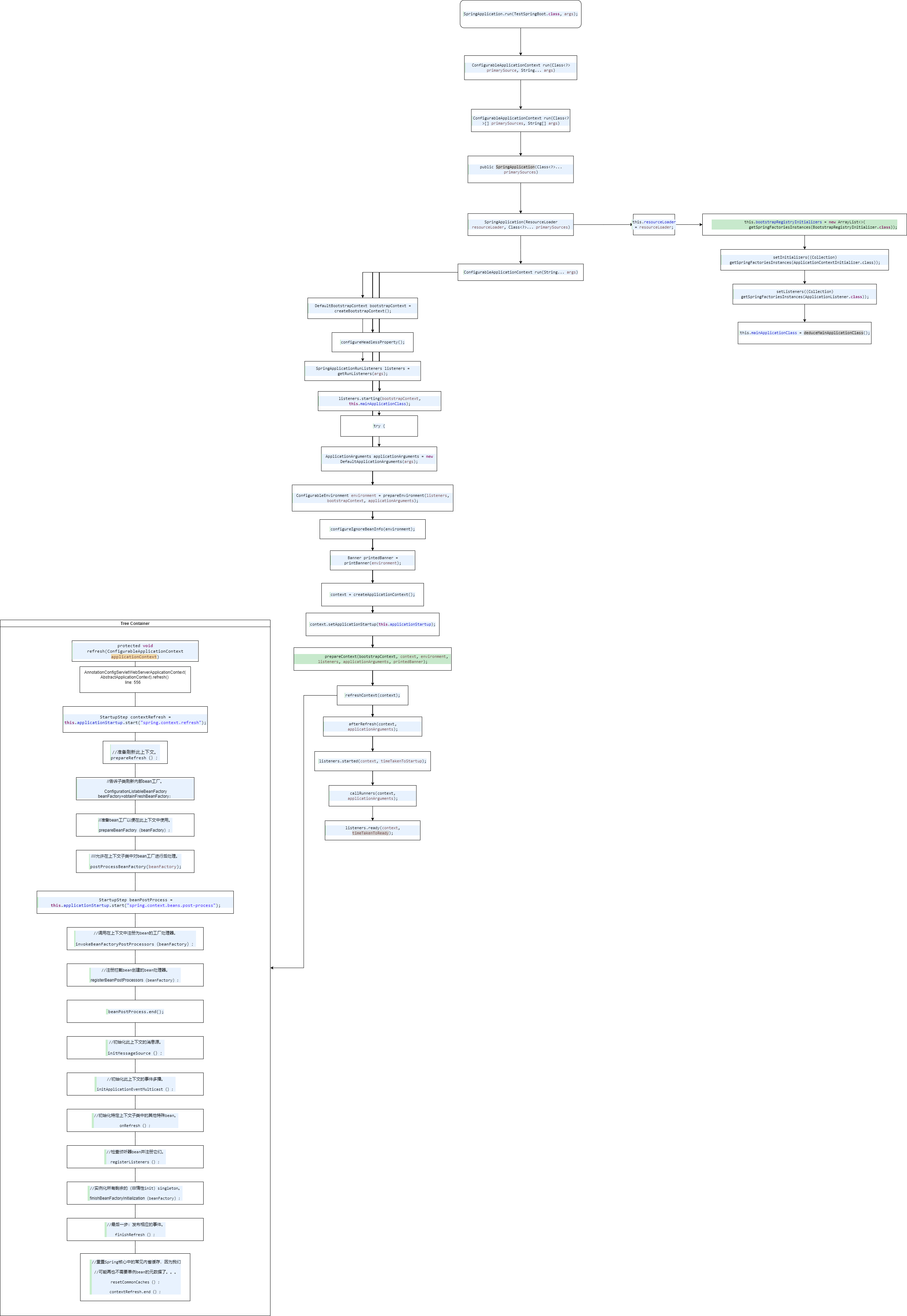
- <span style="color: #000000;">SpringApplication.</span><span style="color: #000000; font-style: italic;">run</span><span style="color: #000000;">(TestSpringBoot.</span><span style="color: #7f0055; font-weight: bold;">class</span><span style="color: #000000;">, </span><span style="color: #6a3e3e;">args</span><span style="color: #000000;">);</span>
    
    <div drawio-diagram="73"><img src="http://wiki.shopqorg.com/uploads/images/drawio/2023-07/drawing-1-1688781050.png" alt=""/></div>

# SpringBoot

# SpringBoot各个注解作用

1. #### **@ConditionalOnMissingBean**
    
    
    1. 它是修饰bean的一个注解，主要实现的是，当你的bean被注册之后，如果而注册相同类型的bean，就不会成功，它会保证你的bean只有一个，即你的实例只有一个，当你注册多个相同的bean时，会出现异常，以此来告诉人员。
2. #### **@EnableAutoCfiguration**
    
    
    1. **开启自动配置**
3. #### **@RestController**
    
    
    1. **此注解就是@Controller和@ResponseBoby的集合，使用在controller层的，意思就是告诉控制层里面的方法都是以json的格式进行输出。**
4. #### **@Conditional** 
    
    
    1. **注解是用来匹配只有满足所有指定条件才能将Bean注册到Spring上下文中**
5. #### **@Repository：**
    
    
    1. **该注解用于标注数据访问组件，DAO组件的。**
6. #### **@ConditionalOnClass**
    
    
    1. **表示指定的类存在才会解析处理本配置**
7. [![image.png](http://wiki.shopqorg.com/uploads/images/gallery/2023-08/scaled-1680-/image.png)](http://wiki.shopqorg.com/uploads/images/gallery/2023-08/image.png)

# 自动装配原理

1. 通过 **@EnableAutoConfiguration** 注解解析此注解上的 **Import(AutoConfigurationImportSelector.class) 加载spring.factories**
2. **通过 @Conditional等注解配合筛选出符合条件的自动配置类**
3. **通过Bean工厂实例化并处理配置**

# 配置文件加载原理，加载顺序是怎样的

1. **是通事件监听的方式加载配置文件的**
2. <div>加载顺: 
    1. classpath:/
    2. classpath:/config/,
    3. file:./
    4. file:./config/\*/
    5. file:./config/"
    
    </div>

# Java 线程池

# Java 线程相关

- #### 创建线程的方式：

1. 继承 Thread
2. 实现 Runable 接口 **无返回值 无参数**
3. 实现 Callable 接口 <span style="color: rgb(224, 62, 45);">**有返回值 无参数**</span>
4. <span style="color: rgb(0, 0, 0);">线程池</span>

- #### <span style="color: rgb(0, 0, 0);">线程池的七个参数</span>
    
    
    1. <span style="color: rgb(0, 0, 0);">corePoolSize：核心线程池的大小</span>
    2. <span style="color: rgb(0, 0, 0);">maximumPoolSize：最大线程池的大小</span>
    3. <span style="color: rgb(0, 0, 0);">keepAliveTime：当线程池中线程数大于corePoolSize，并且没有可执行任务时大于corePoolSize那部分线程的存活时间</span>
    4. <span style="color: rgb(0, 0, 0);">unit：keepAliveTime的时间单位</span>
    5. <span style="color: rgb(0, 0, 0);">workQueue：用来暂时保存任务的工作队列</span>
    6. <span style="color: rgb(0, 0, 0);">threadFactory：线程工厂提供线程的创建方式，默认使用Executors.defaultThreadFactory()</span>
    7. <span style="color: rgb(0, 0, 0);">handler：当线程池所处理的任务数超过其承载容量或关闭后继续有任务提交时，所调用的拒绝策略</span>
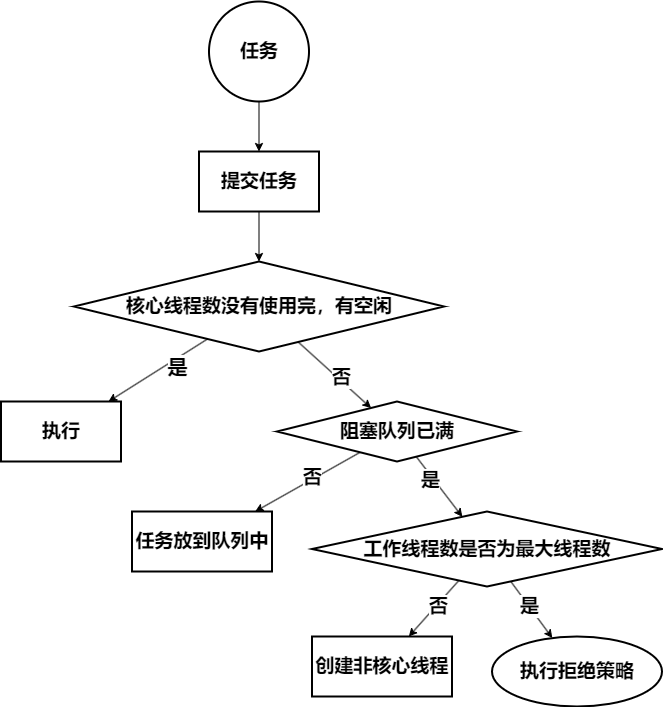
- #### <span style="color: rgb(0, 0, 0);">线程池执行任务的方式</span>
    
    
    - <div drawio-diagram="81"><img src="http://wiki.shopqorg.com/uploads/images/drawio/2023-08/drawing-1-1692606092.png" alt=""/>  
        </div>
- #### 为什么先执行阻塞队列而不先执行创建非核心线程数？
    
    
    - 最大化资源利用
    - 举个例子 
        - 饭店（线程池）----&gt; 厨子（线程）-------&gt; 人多先排队（阻塞队列）【天天客满，忙不过来】-----&gt; 招厨子---&gt;今日客满（拒绝策略）
- #### 线程池属性标识
    
    
    - <table border="1" style="border-collapse: collapse; width: 113.054%; height: 137.797px;"><colgroup><col style="width: 100%;"></col></colgroup><tbody><tr style="height: 137.797px;"><td style="height: 137.797px;"><span style="color: #7f0055; font-weight: bold;">// 线程池信息：有两个作用 高三位代表 </span><span style="color: rgb(0, 0, 0);">**线程池状态，低29位代表线程池中的线程数量**</span>
        
        <span style="color: #7f0055; font-weight: bold;">private</span><span style="color: #000000;"> </span><span style="color: #7f0055; font-weight: bold;">final</span><span style="color: #000000;"> AtomicInteger </span><span style="color: #0000c0;">ctl</span><span style="color: #000000;"> = </span><span style="color: #7f0055; font-weight: bold;">new</span><span style="color: #000000;"> AtomicInteger(</span><span style="color: #000000; font-style: italic;">ctlOf</span><span style="color: #000000;">(</span><span style="color: #0000c0; font-style: italic; font-weight: bold;">RUNNING</span><span style="color: #000000;">, 0));</span>
        
        <span style="color: #000000;">// 代表 29 方便计算 </span>
        
        <span style="color: #000000;"> </span><span style="color: #7f0055; font-weight: bold;">private</span><span style="color: #000000;"> </span><span style="color: #7f0055; font-weight: bold;">static</span><span style="color: #000000;"> </span><span style="color: #7f0055; font-weight: bold;">final</span><span style="color: #000000;"> </span><span style="color: #7f0055; font-weight: bold;">int</span><span style="color: #000000;"> </span><span style="color: #0000c0; font-style: italic; font-weight: bold;">COUNT\_BITS</span><span style="color: #000000;"> = Integer.</span><span style="color: #0000c0; font-style: italic; font-weight: bold;">SIZE</span><span style="color: #000000;"> - 3;</span>
        
        <span style="color: #000000;">// 线程池最大容量</span>
        
        <span style="color: #000000;"> </span><span style="color: #7f0055; font-weight: bold;">private</span><span style="color: #000000;"> </span><span style="color: #7f0055; font-weight: bold;">static</span><span style="color: #000000;"> </span><span style="color: #7f0055; font-weight: bold;">final</span><span style="color: #000000;"> </span><span style="color: #7f0055; font-weight: bold;">int</span><span style="color: #000000;"> </span><span style="color: #0000c0; font-style: italic; font-weight: bold;">CAPACITY</span><span style="color: #000000;"> = (1 &lt;&lt; </span><span style="color: #0000c0; font-style: italic; font-weight: bold;">COUNT\_BITS</span><span style="color: #000000;">) - 1;</span>
        
        <span style="color: #000000;"> </span><span style="color: #3f7f5f;">// 线程池状态</span>
        
        <span style="color: #3f7f5f;"><span style="color: #000000;">// <span style="color: #0000c0; font-style: italic; font-weight: bold;">RUNNING</span> 111 代表线程池正常执行 ，正常接收任务</span></span>
        
        <span style="color: #000000;"> </span><span style="color: #7f0055; font-weight: bold;">private</span><span style="color: #000000;"> </span><span style="color: #7f0055; font-weight: bold;">static</span><span style="color: #000000;"> </span><span style="color: #7f0055; font-weight: bold;">final</span><span style="color: #000000;"> </span><span style="color: #7f0055; font-weight: bold;">int</span><span style="color: #000000;"> </span><span style="color: #0000c0; font-style: italic; font-weight: bold;">RUNNING</span><span style="color: #000000;"> = -1 &lt;&lt; </span><span style="color: #0000c0; font-style: italic; font-weight: bold;">COUNT\_BITS</span><span style="color: #000000;">; </span>
        
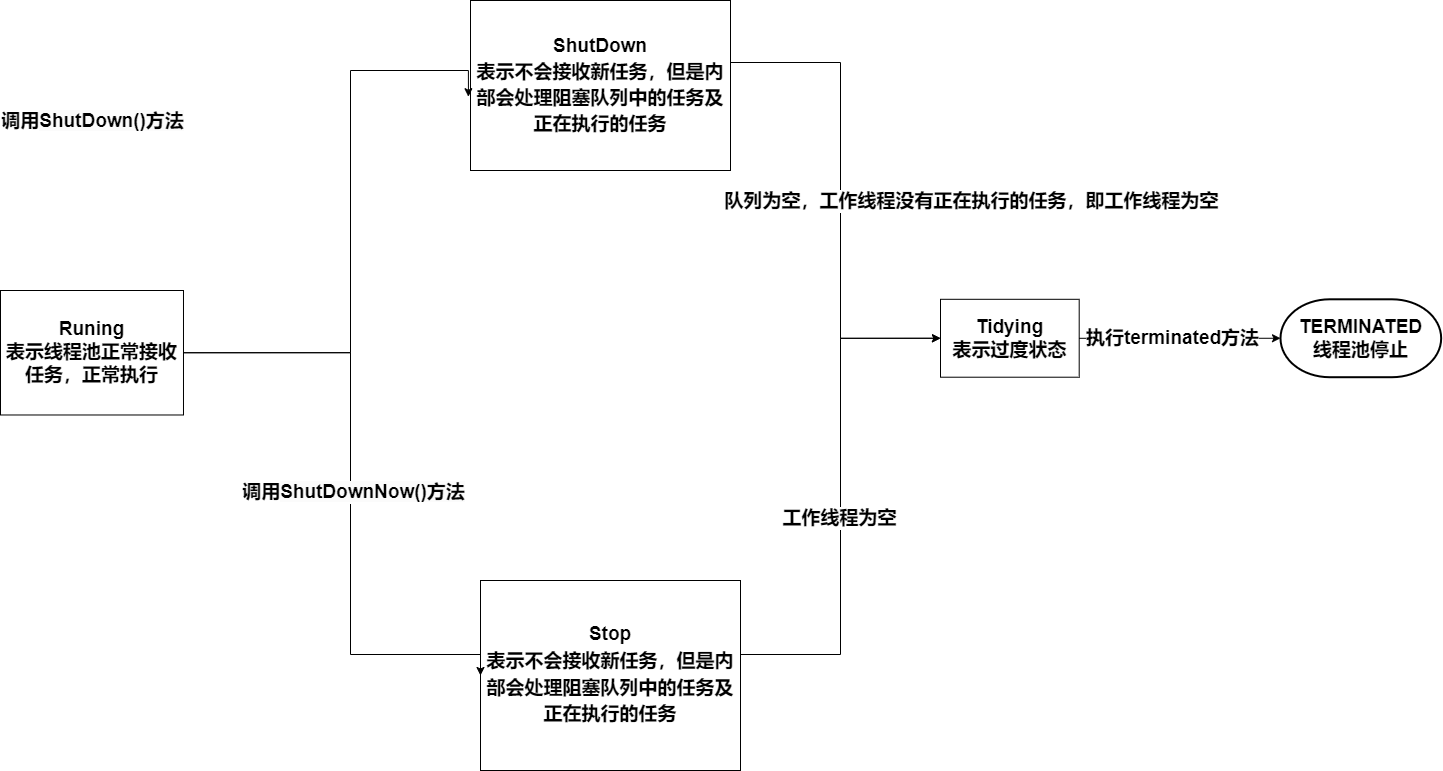
        <span style="color: #000000;">// 000 代表线程池位<span style="color: #0000c0; font-style: italic; font-weight: bold;">SHUTDOWN</span> 状态 表示 不在接收新任务，但是内部会处理阻塞队列中的任务和正在执行的任务</span>
        
        <span style="color: #000000;"> </span><span style="color: #7f0055; font-weight: bold;">private</span><span style="color: #000000;"> </span><span style="color: #7f0055; font-weight: bold;">static</span><span style="color: #000000;"> </span><span style="color: #7f0055; font-weight: bold;">final</span><span style="color: #000000;"> </span><span style="color: #7f0055; font-weight: bold;">int</span><span style="color: #000000;"> </span><span style="color: #0000c0; font-style: italic; font-weight: bold;">SHUTDOWN</span><span style="color: #000000;"> = 0 &lt;&lt; </span><span style="color: #0000c0; font-style: italic; font-weight: bold;">COUNT\_BITS</span><span style="color: #000000;">;</span>
        
        <span style="color: #000000;">// 001 代表线程池为stop 状态，表示不再接收新任务，内部不在处理阻塞队列中的任务，同时中断正在执行的任务 </span>
        
        <span style="color: #000000;"> </span><span style="color: #7f0055; font-weight: bold;">private</span><span style="color: #000000;"> </span><span style="color: #7f0055; font-weight: bold;">static</span><span style="color: #000000;"> </span><span style="color: #7f0055; font-weight: bold;">final</span><span style="color: #000000;"> </span><span style="color: #7f0055; font-weight: bold;">int</span><span style="color: #000000;"> </span><span style="color: #0000c0; font-style: italic; font-weight: bold;">STOP</span><span style="color: #000000;"> = 1 &lt;&lt; </span><span style="color: #0000c0; font-style: italic; font-weight: bold;">COUNT\_BITS</span><span style="color: #000000;">;</span>
        
        <span style="color: #000000;">// 010 代表线程池为<span style="color: #0000c0; font-style: italic; font-weight: bold;">TIDYING</span> 状态，表示为过度状态，要执行terminated()方法, 代表线程池即将停止</span>
        
        <span style="color: #000000;"> </span><span style="color: #7f0055; font-weight: bold;">private</span><span style="color: #000000;"> </span><span style="color: #7f0055; font-weight: bold;">static</span><span style="color: #000000;"> </span><span style="color: #7f0055; font-weight: bold;">final</span><span style="color: #000000;"> </span><span style="color: #7f0055; font-weight: bold;">int</span><span style="color: #000000;"> </span><span style="color: #0000c0; font-style: italic; font-weight: bold;">TIDYING</span><span style="color: #000000;"> = 2 &lt;&lt; </span><span style="color: #0000c0; font-style: italic; font-weight: bold;">COUNT\_BITS</span><span style="color: #000000;">;</span>
        
        <span style="color: #000000;">// 011 代表<span style="color: #0000c0; font-style: italic; font-weight: bold;">TERMINATED</span> ，表示线程池真正的停止了</span>
        
        <span style="color: #000000;"> </span><span style="color: #7f0055; font-weight: bold;">private</span><span style="color: #000000;"> </span><span style="color: #7f0055; font-weight: bold;">static</span><span style="color: #000000;"> </span><span style="color: #7f0055; font-weight: bold;">final</span><span style="color: #000000;"> </span><span style="color: #7f0055; font-weight: bold;">int</span><span style="color: #000000;"> </span><span style="color: #0000c0; font-style: italic; font-weight: bold;">TERMINATED</span><span style="color: #000000;"> = 3 &lt;&lt; </span><span style="color: #0000c0; font-style: italic; font-weight: bold;">COUNT\_BITS</span><span style="color: #000000;">;</span>
        
        <span style="color: #000000;"> </span><span style="color: #3f7f5f;">// 得到线程池的状态</span>
        
        <span style="color: #000000;"> </span><span style="color: #7f0055; font-weight: bold;">private</span><span style="color: #000000;"> </span><span style="color: #7f0055; font-weight: bold;">static</span><span style="color: #000000;"> </span><span style="color: #7f0055; font-weight: bold;">int</span><span style="color: #000000;"> runStateOf(</span><span style="color: #7f0055; font-weight: bold;">int</span><span style="color: #000000;"> </span><span style="color: #6a3e3e;">c</span><span style="color: #000000;">) { </span><span style="color: #7f0055; font-weight: bold;">return</span><span style="color: #000000;"> </span><span style="color: #6a3e3e;">c</span><span style="color: #000000;"> &amp; ~</span><span style="color: #0000c0; font-style: italic; font-weight: bold;">CAPACITY</span><span style="color: #000000;">; }</span>
        
        <span style="color: #000000;">// 得到线程池正在工作的线程数量 </span>
        
        <span style="color: #000000;"> </span><span style="color: #7f0055; font-weight: bold;">private</span><span style="color: #000000;"> </span><span style="color: #7f0055; font-weight: bold;">static</span><span style="color: #000000;"> </span><span style="color: #7f0055; font-weight: bold;">int</span><span style="color: #000000;"> workerCountOf(</span><span style="color: #7f0055; font-weight: bold;">int</span><span style="color: #000000;"> </span><span style="color: #6a3e3e;">c</span><span style="color: #000000;">) { </span><span style="color: #7f0055; font-weight: bold;">return</span><span style="color: #000000;"> </span><span style="color: #6a3e3e;">c</span><span style="color: #000000;"> &amp; </span><span style="color: #0000c0; font-style: italic; font-weight: bold;">CAPACITY</span><span style="color: #000000;">; }</span>
        
        <span style="color: #000000;"> </span><span style="color: #7f0055; font-weight: bold;">private</span><span style="color: #000000;"> </span><span style="color: #7f0055; font-weight: bold;">static</span><span style="color: #000000;"> </span><span style="color: #7f0055; font-weight: bold;">int</span><span style="color: #000000;"> ctlOf(</span><span style="color: #7f0055; font-weight: bold;">int</span><span style="color: #000000;"> </span><span style="color: #6a3e3e;">rs</span><span style="color: #000000;">, </span><span style="color: #7f0055; font-weight: bold;">int</span><span style="color: #000000;"> </span><span style="color: #6a3e3e;">wc</span><span style="color: #000000;">) { </span><span style="color: #7f0055; font-weight: bold;">return</span><span style="color: #000000;"> </span><span style="color: #6a3e3e;">rs</span><span style="color: #000000;"> | </span><span style="color: #6a3e3e;">wc</span><span style="color: #000000;">; }</span>
        
        </td></tr></tbody></table>
    - ##### 线程状态变化
        
        <div drawio-diagram="93"><img src="http://wiki.shopqorg.com/uploads/images/drawio/2023-08/drawing-1-1692613548.png" alt=""/></div>
- #### Execute 方法解读
    
    
    - ```java
         public void execute(Runnable command) {
                if (command == null)
                    throw new NullPointerException();
                /*
                 按3个步骤进行：
        
                *
               1。如果运行的线程少于corePoolSize，请尝试
                *以给定的命令作为第一个线程启动一个新线程
                *任务。调用addWorker会自动检查runState和
                * workerCount，这样可以防止误报警
                *在不应该执行线程时返回false。
                ＊
                * 2。如果一个任务可以成功排队，那么我们仍然需要
                *检查我们是否应该添加一个线程
                *(因为自上次检查以来现有的已死亡)或其他
                进入此方法后池关闭。所以我们
                *重新检查状态，必要时回滚队列
                * stopped，或者在没有线程时启动一个新线程。
                ＊
                * 3。如果我们不能排队任务，那么我们尝试添加一个新的
                *线程。如果它失败了，我们知道我们被关闭或饱和了
                *，因此拒绝该任务。
                 */
                // 线程池信息 有两个作用 高三位代表 线程池状态，低29位代表线程池中的线程数量
                int c = ctl.get();
        
                // 判断线程池中的工作线程数量是否小于核心线程数
                if (workerCountOf(c) < corePoolSize) {
                    // 创建核心线程 执行任务
                    if (addWorker(command, true))
                        return;
                    // 创建核心线程数失败，说明核心线程执行的任务已满 再次获取线程池信息
                    c = ctl.get();
                }
        
                // 判断线程池是否是Running状态且可以把任务放到队列中
                if (isRunning(c) && workQueue.offer(command)) {
        
                    // 再次获取线程池信息
                    int recheck = ctl.get();
                    // 判断程池是否是非Running状态， 是的话移除任务
                    if (! isRunning(recheck) && remove(command))
                        // 执行拒绝策略
                        reject(command);
                    // 如果线程池状态为Running状态，但是线程池中工作线程数量为0
                    else if (workerCountOf(recheck) == 0)
                        // 阻塞队列中有任务，但是没有工作线程处理，则创建一个任务为null的工作线程去处理阻塞队列中的任务
                        addWorker(null, false);
                }
               // 阻塞队列已满，创建非核心线程处理任务
                else if (!addWorker(command, false))
                  // 失败则执行拒绝策略
                    reject(command);
            }
        ```
- #### addWorker 方法解读
    
    
    - ```java
        private boolean addWorker(Runnable firstTask, boolean core) {
                retry:
                // 通过大量的循环和判断，目的是让工作线程数加1
                for (;;) {
                    // 线程池信息 有两个作用 高三位代表 线程池状态，低29位代表线程池中的线程数量
                    int c = ctl.get();
        
                    // 获取线程池状态
                    int rs = runStateOf(c);
        
                    // 
                    if (
                      // 判断 线程池状态 (除了 Running 都有可能)
                      // runState is stored in the high-order bits
                      // RUNNING    = -1 << COUNT_BITS;
                      // SHUTDOWN   =  0 << COUNT_BITS;
                      // STOP       =  1 << COUNT_BITS;
                      // TIDYING    =  2 << COUNT_BITS;
                      // TERMINATED =  3 << COUNT_BITS;
                      rs >= SHUTDOWN 
                        &&
                        ! (
                          // 线程池状态为Shutdown，如果状态不是Shutdown 则可能是 STOP 等更高的状态，则现在不需要添加线程处理任务
                          rs == SHUTDOWN 
                           &&
                          // 任务为null, 如果任务为空 线程池状态又不为Running 则不需要添加线程处理任务
                           firstTask == null 
                           &&
                          // 阻塞队列不为空，取反后为空，代表阻塞队列为空则不需要处理
                           ! workQueue.isEmpty()
                          ))
                       // 创建线程失败
                        return false;
                  
                    for (;;) {
                        // 获取工作线程数量
                        int wc = workerCountOf(c);
                      
                        if (
                          // 如果工作线程数量大于线程池最大线程容量，就不创建线程了
                          wc >= CAPACITY ||
                          // 或者 工作线程数量大于核心线程数量或最大线程数量，就不创建线程了
                            wc >= (core ? corePoolSize : maximumPoolSize))
                            // 创建线程失败
                            return false;
                        // 工作线程数量 +1， 利用CAS锁
                        if (compareAndIncrementWorkerCount(c))
                            // 跳出外层循环
                            break retry;
                        // 再次  线程池信息
                        c = ctl.get(); 
                        //  判断线程池状态是否有变化，没有变化，则执行内层循环
                        if (runStateOf(c) != rs)
                            // 有变化，执行外层循环
                            continue retry;
                        
                    }
                }
        
                boolean workerStarted = false;
                boolean workerAdded = false;
                Worker w = null;
                try {
                    w = new Worker(firstTask);
                    final Thread t = w.thread;
                    if (t != null) {
                        // 加锁， 原因，创建任务线程时，避免外部操作停止了线程池，销毁线程池是需要拿到锁的
                        final ReentrantLock mainLock = this.mainLock;
                        mainLock.lock();
                        try {
                            // Recheck while holding lock.
                            // Back out on ThreadFactory failure or if
                            // shut down before lock acquired.
                            // 重新获取线程池运行状态
                            int rs = runStateOf(ctl.get());
        
                            if (
                              // rs < SHUTDOWN 只有一种情况 rs = Running
                              rs < SHUTDOWN ||
                                // 或者 rs 的状态为 SHUTDOWN 且 firstTask 为null 时，创建工作线程，处理阻塞队列中的任务
                                (rs == SHUTDOWN && firstTask == null)) {
                                // 线程是否已启动
                                if (t.isAlive()) 
                                    // 因为状态没有改变就启动了，说明外部干扰线程池工作，抛出异常
                                    throw new IllegalThreadStateException();
                                // 添加工作线程
                                workers.add(w);
                                // 调整之前记录的最大线程数数量
                                int s = workers.size();
                                if (s > largestPoolSize)
                                    largestPoolSize = s;
                                // 修改状态
                                workerAdded = true;
                            }
                        } finally {
                            mainLock.unlock();
                        }
                        if (workerAdded) {
                            // 启动线程
                            t.start();
                            workerStarted = true;
                        }
                    }
                } finally {
                    if (! workerStarted)
                        addWorkerFailed(w);
                }
                return workerStarted;
            }
        
        ```
- #### Worker 的封装
    
    
    - ```java
        final void runWorker(Worker w) {
              // 获取当前线程
              Thread wt = Thread.currentThread();
              // 拿到当前任务
              Runnable task = w.firstTask;
              w.firstTask = null;
              w.unlock(); // allow interrupts
              boolean completedAbruptly = true;
              try {
                  // 如果线程不等于空 或 为空的时候从阻塞队列中获取任务
                  while (task != null || (task = getTask()) != null) {
                      // 加锁，线程池shutdown了也不影响我继续执行
                      w.lock();
                      // If pool is stopping, ensure thread is interrupted;
                      // if not, ensure thread is not interrupted.  This
                      // requires a recheck in second case to deal with
                      // shutdownNow race while clearing interrupt
                      // 如果 线程池状态大于等于 STOP，代表线程池已经不是Running状态了，即出现问题了，则中断当前线程
                      if ((runStateAtLeast(ctl.get(), STOP) ||
                           (Thread.interrupted() &&
                            runStateAtLeast(ctl.get(), STOP))) &&
                          !wt.isInterrupted())
                          wt.interrupt();
                      try {
                          // 任务执行前置处理
                          beforeExecute(wt, task);
                          Throwable thrown = null;
                          try {
                              // 执行
                              task.run();
                          } catch (RuntimeException x) {
                              thrown = x; throw x;
                          } catch (Error x) {
                              thrown = x; throw x;
                          } catch (Throwable x) {
                              thrown = x; throw new Error(x);
                          } finally {
                             // 任务执行后置处理
                              afterExecute(task, thrown);
                          }
                      } finally {
                          task = null; 
                          // 完成任务数加1
                          w.completedTasks++;
                          w.unlock();
                      }
                  }
                  completedAbruptly = false;
              } finally {
                  // woker 退出后续处理
                  processWorkerExit(w, completedAbruptly);
              }
        }
        ```
- #### getTask解读
    
    
    - ```java
        private Runnable getTask() {
            // 表示（非核心线程可以干掉）
            boolean timedOut = false; // Did the last poll() time out?
        
            for (;;) {
              // ====================== 判断线程池状态 =======================================
                // 获取线程池完整信息
                int c = ctl.get();
                // 获取线程池状态
                int rs = runStateOf(c);
        
                // 如果线程池状态>=SHUTDOWN,则 rs 可能为 Shutdown，STOP, Tidying, TERMINATED 且（rs >= STOP，则移除当前工作线程
                // 如果线程池状态>=SHUTDOWN 且 队列为空，则移除当前工作线程
                if (rs >= SHUTDOWN && (rs >= STOP || workQueue.isEmpty())) {
                   // 则 递减ctl的workerCount字段，减少woker 数量，为移除当前工作线程做准备
                    decrementWorkerCount();
                    // 交付 processWorkerExit 后续处理
                    return null;
                }
                // ====================== 判断工作线程数量 =======================================
              
                // 获取woker 数量
                int wc = workerCountOf(c);
        
                 // 是否计时
                // allowCoreThreadTimeOut：表示线程池核心线程是否可以超时，一般为false
                // 或者工作线程数量已超过线程池核心线程数量
                boolean timed = allowCoreThreadTimeOut || wc > corePoolSize;
        
                if (
                  // 如果 wc 大于线程池线程最大数量 或 工作线程已超时
                  (wc > maximumPoolSize || (timed && timedOut))
                    //  wc > 1 或 队列为空, 尝试停止工作线程工作，因为wc>1 ,停止一个，还有其他的工作线程
                    && (wc > 1 || workQueue.isEmpty())) {
                    // 基于 CAS 停止工作线程工作, 只有一个可以成功
                    if (compareAndDecrementWorkerCount(c))
                        // 交付 processWorkerExit 后续处理
                        return null;
                    continue;
                }
        
                try {
                    // 获取任务， 是否计时，
                    Runnable r = timed ?
                        // 计时 走这个 从阻塞队列中阻塞一段时间获取任务
                        workQueue.poll(keepAliveTime, TimeUnit.NANOSECONDS) :
                        // 不计时，一直阻塞，直至拿到任务
                        workQueue.take();
                    if (r != null)
                        // 返回任务
                        return r;
                    //  说明从队列中获取任务已超时，已达到线程最大生存时间，再走一遍
                    timedOut = true;
                } catch (InterruptedException retry) {
                    timedOut = false;
                }
            }
        }
        ```
- #### processWorkerExit 讲解
    
    
    - ```java
        private void processWorkerExit(Worker w, boolean completedAbruptly) {
            // 如果 processWorkerExit 操作 不是 getTask 中引起的，而是异常引起的（一般是异常由钩子函数引起的）
            if (completedAbruptly)
                // 执行方式有问题“不合法” 手动减少工作线程数量
                decrementWorkerCount();
        
            // 加锁
            final ReentrantLock mainLock = this.mainLock;
            mainLock.lock();
            try {
                // 增加任务完成数量
                completedTaskCount += w.completedTasks;
                // 从阻塞队列中移除任务
                workers.remove(w);
            } finally {
                mainLock.unlock();
            }
        
            // 尝试把工作线程池状态从 过度状态 ----> 销毁状态
            tryTerminate();
        
            // 获取线程池信息
            int c = ctl.get();
            // 判断 线程池状态 是否比 STOP 小 
            if (runStateLessThan(c, STOP)) {
                // 代表 线程池状态 是 Running 或 Shutdown
                // 若 !completedAbruptly 为true，则说明 执行的任务没有异常
                if (!completedAbruptly) {
                    // 最小 工作线程数量
                    int min = allowCoreThreadTimeOut ? 0 : corePoolSize;
                    // 若 最小数量为0 且队列是空的
                    if (min == 0 && ! workQueue.isEmpty())
                        // 则 将min置为 1
                        min = 1;
                    // 若线程池中的工作线程大于最小线程数量，则说明线程池工作线程还富余
                    if (workerCountOf(c) >= min)
                        return; // replacement not needed
                }
                // 说明 工作线程 以非正常方式结束，则新添加一个非核心工作线程
                // 若 阻塞队列不为空，且没有工作线程，则新添加一个非核心工作线程
                addWorker(null, false);
            }
        }
        ```

# Java 集合

# 集合之间的关系

1. #### 集合体系关系UML

# HashMap 重点源码解析

```java
package com.util;

import java.io.IOException;
import java.io.InvalidObjectException;
import java.io.Serializable;
import java.util.AbstractCollection;
import java.util.AbstractSet;
import java.util.Collection;
import java.util.ConcurrentModificationException;
import java.util.Iterator;
import java.util.Map;
import java.util.NoSuchElementException;
import java.util.Set;
import java.util.Spliterator;
import java.util.function.BiConsumer;
import java.util.function.BiFunction;
import java.util.function.Consumer;
import java.util.function.Function;
import sun.misc.SharedSecrets;

public class HashMap<K, V> extends AbstractMap<K, V> implements Map<K, V>, Cloneable, Serializable {

	private static final long serialVersionUID = 362498820763181265L;

	/*
	 * 这个映射通常作为一个桶状哈希表，但是 当箱子太大时，它们会被转换成 TreeNodes，每个结构类似于
	 * java.util.TreeMap。大多数方法尝试使用正常的箱子，但是 在适用时中继到TreeNode方法(只需通过检查)
	 * instanceof一个节点)。
	 * 
	 * 可以遍历和遍历TreeNodes的Bins 与其他类似，但额外支持更快的查找 当人口过剩时。
	 * 
	 * 然而，由于绝大多数垃圾箱在 正常使用时不超载，检查是否存在 树箱可能在表方法的过程中被延迟。
	 * 
	 * 树箱(即，其元素都是treenode的箱)是主要由hashCode排序，但在领带的情况下，如果两个
	 * 元素具有相同的"class C implements Comparable<C>"，类型，
	 * 
	 * 则使用它们的compareTo方法进行排序。(我们 通过反射保守检查泛型类型来验证 this——参见methodcomparableClassFor)。
	 * 
	 * 增加的复杂性 的树箱在提供最坏情况O(log n)时是值得的 当键有不同的哈希值或者是 有序的，因此，性能下降优雅
	 * hashCode()方法的意外或恶意使用 返回分布不佳的值，以及 许多键共享一个hashCode，
	 * 
	 * 只要它们也是具有可比性。(如果这两项都不适用，我们可能会浪费大约100万美元 在时间和空间上是不采取行动的两倍 预防措施。但唯一已知的案例源于糟糕的使用者
	 * 编程实践已经非常缓慢，这使得 差别不大。) ＊ 因为treenode的大小大约是普通节点的两倍，我们 仅当bin包含足够的节点以保证使用时使用它们
	 * (见MapUtilConst.MapUtilConst.TREEIFY_THRESHOLD)。当它们变得太小时(由于)
	 * 移除或调整大小)它们被转换回普通的垃圾箱。在 使用分布良好的用户hashCodes，树箱是 很少使用。 理想情况下，在随机哈希码下，的频率
	 * 箱中的*节点遵循泊松分布(http://en.wikipedia.org/wiki/Poisson_distribution)与a
	 * 参数，默认大小调整平均约为0.5 阈值为0.75，虽然由于 调整粒度。忽略方差，即期望值 列表大小k的出现次数为(exp(-0.5) * pow(0.5,
	 * k) / factorial (k))。第一个值是:
	 * 
	 * 
	 * 笔记 拼音
	 *
	 * 0: 0.60653066 1: 0.30326533 2: 0.07581633 3: 0.01263606 4: 0.00157952 5:
	 * 0.00015795 6: 0.00001316 7: 0.00000094 8: 0.00000006 more: less than 1 in ten
	 * million
	 *
	 * bin树的根通常是它的第一个节点。然而,有时 (目前仅在Iterator.remove上)，根节点可能在其他地方，但可以
	 * 在父链接之后恢复(方法TreeNode.root())。
	 *
	 * 所有适用的内部方法都接受一个哈希码作为参数 通常由公共方法提供)，允许它们相互调用 无需重新计算用户的哈希值。大多数内部方法也接受一个“tab”。
	 * 参数，通常是当前表，但也可能是新表或旧表 当调整大小或转换时。
	 *
	 * 当bin列表被树形化、分割或未树形化时，我们将它们保持不变 更好地保存相对访问/遍历顺序(即Node.next字段) 局部性，并稍微简化拆分和遍历的处理
	 * 调用iterator.remove方法。在插入时使用比较器时，保留一个总数 在重新平衡时进行排序(或尽可能接近)，我们进行比较
	 * classes和identityHashCodes是决定因素。
	 *
	 * 普通模式和树模式之间的使用和转换是复杂的 存在子类LinkedHashMap。下面是钩子方法的定义
	 * 在允许LinkedHashMap内部操作的插入、删除和访问时调用 保持独立于这些机制。(这也要求 将map实例传递给一些可能会创建新节点的工具方法。)
	 *
	 * 类似于并发编程的基于ssa的编码风格有助于避免别名 所有扭曲的指针操作都会出错。
	 * 
	 */

	/* ---------------- Static utilities -------------- */

	/**
	 * 计算key.hashCode()，并将哈希值的高位按XORs对齐到低位。 因为该表使用2的幂次掩码，所以散列值的集合只在
	 * 当前掩码上方的比特位始终会发生碰撞。 (已知的例子有 在小表格中保存连续整数的浮点键集合。) 所以我们
	 * 应用一个转换，将高比特位的影响向下扩展。有一个比特扩展的速度、效用和质量之间的权衡。 因为很多 公共哈希集合已经合理分布(所以不要从中受益
	 * 避免传播)，因为我们使用树来处理大量的碰撞 在bin中，我们只需要以可能的最便宜的方式异或移位一些位即可 系统损耗，以及对合并影响的最高位表示
	 * 由于表的边界，否则将永远不会用于索引计算。
	 * https://blog.csdn.net/liuxingrong666/article/details/103640412
	 */
	static final int hash(Object key) {
		int h;
		return (key == null) ? 0 : (h = key.hashCode()) ^ (h >>> 16);
	}

	/**
	 * 把不是2的幂的值改成是2的幂 https://blog.csdn.net/ywb201314/article/details/120022308
	 */
	static final int tableSizeFor(int cap) {
		int n = cap - 1;
		n |= n >>> 1;
		n |= n >>> 2;
		n |= n >>> 4;
		n |= n >>> 8;
		n |= n >>> 16;
		return (n < 0) ? 1 : (n >= MapUtilConst.MAXIMUM_CAPACITY) ? MapUtilConst.MAXIMUM_CAPACITY : n + 1;
	}

	/* ---------------- Fields -------------- */

	/**
	 * The table, initialized on first use, and resized as necessary. When
	 * allocated, length is always a power of two. (We also tolerate length zero in
	 * some operations to allow bootstrapping mechanics that are currently not
	 * needed.) hash表
	 */
	transient Node<K, V>[] table;

	/**
	 * 保存缓存的entrySet()。注意，AbstractMap字段用于keySet() 和values()。
	 */
	transient Set<Map.Entry<K, V>> entrySet;

	/**
	 * 包含的键值映射的数量。
	 */
	transient int size;

	/**
	 * 
	 * modCount便是hashmap结构修改的次数。
	 * 在之前对iterator（迭代器）进行讲解的时候我已经进行了说明，
	 * 需要注意的是在hashmap中modcount指的是结构更改的次数，例如添加新的node，
	 * 但是如果是替换原有node的value，modcount是不变的，因为它不属于结构变化。
	 * 
	 */
	transient int modCount;

	/**
	 * threshold是hashmap所能容纳的最大数据量的Node个数，
	 * 默认为0.75，threshold=DEFAULT_INITIAL_CAPACITY*loadFactor;当添加元素数量超过这个数量过后，就要进行扩容，扩容后hashmap的容量是之前的两倍
	 */
	int threshold;

	/**
	 * The load factor for the hash table.
	 *
	 * @serial
	 */
	final float loadFactor;

	/* ---------------- Public operations -------------- */

	/**
	 * Constructs an empty <tt>HashMap</tt> with the specified initial capacity and
	 * load factor.
	 *
	 * @param initialCapacity the initial capacity
	 * @param loadFactor      the load factor
	 * @throws IllegalArgumentException if the initial capacity is negative or the
	 *                                  load factor is nonpositive
	 */
	public HashMap(int initialCapacity, float loadFactor) {
		if (initialCapacity < 0)
			throw new IllegalArgumentException("Illegal initial capacity: " + initialCapacity);
		if (initialCapacity > MapUtilConst.MAXIMUM_CAPACITY)
			initialCapacity = MapUtilConst.MAXIMUM_CAPACITY;
		if (loadFactor <= 0 || Float.isNaN(loadFactor))
			throw new IllegalArgumentException("Illegal load factor: " + loadFactor);
		this.loadFactor = loadFactor;
		this.threshold = tableSizeFor(initialCapacity);
	}

	/**
	 * Constructs an empty <tt>HashMap</tt> with the specified initial capacity and
	 * the default load factor (0.75).
	 *
	 * @param initialCapacity the initial capacity.
	 * @throws IllegalArgumentException if the initial capacity is negative.
	 */
	public HashMap(int initialCapacity) {
		this(initialCapacity, MapUtilConst.DEFAULT_LOAD_FACTOR);
	}

	/**
	 * Constructs an empty <tt>HashMap</tt> with the default initial capacity (16)
	 * and the default load factor (0.75).
	 */
	public HashMap() {
		this.loadFactor = MapUtilConst.DEFAULT_LOAD_FACTOR; // all other fields defaulted
	}

	/**
	 * Constructs a new <tt>HashMap</tt> with the same mappings as the specified
	 * <tt>Map</tt>. The <tt>HashMap</tt> is created with default load factor (0.75)
	 * and an initial capacity sufficient to hold the mappings in the specified
	 * <tt>Map</tt>.
	 *
	 * @param m the map whose mappings are to be placed in this map
	 * @throws NullPointerException if the specified map is null
	 */
	public HashMap(Map<? extends K, ? extends V> m) {
		this.loadFactor = MapUtilConst.DEFAULT_LOAD_FACTOR;
		putMapEntries(m, false);
	}

	/**
	 * 该函数用于将一个map赋值给新的HashMap
	 * 
	 * 
	
	if (table == null)分支，说明是HashMap的拷贝构造函数来调用的putMapEntries，或者是构造以后还没有放过任何元素，然后再调用putAll。
	float ft = ((float)s / loadFactor) + 1.0F
	这里的加1是因为，size / loadFactor = capacity，但如果算出来的capacity是小数，却又向下取整，会造成容量不够大，
	所以，如果是小数的capacity，那么必须向上取整。
	
	算出来的容量必须小于最大容量MAXIMUM_CAPACITY，否则直接让capacity等于MAXIMUM_CAPACITY。
	
	if (t > threshold)这里的threshold成员实际存放的值是capacity的值。
	因为在table还没有初始化时（table还是null），用户给定的capacity会暂存到threshold成员上去（毕竟HashMap没有一个成员叫做capacity，capacity是作为table数组的大小而隐式存在的）。
	
	else if (s > threshold)说明传入map的size都已经大于当前map的threshold了，即当前map肯定是装不下两个map的并集的，所以这里必须要执行resize操作。
	最后循环里的putVal可能也会触发resize操作
	 * 
	 * 
	 * Implements Map.putAll and Map constructor.
	 *
	 *
	 * @param m     the map
	 * @param evict false when initially constructing this map, else true (relayed
	 *              to method afterNodeInsertion).
	 */
	final void putMapEntries(Map<? extends K, ? extends V> m, boolean evict) {
		int s = m.size();

		if (s <= 0) {
			return;
		}
		// 判断table是否已经初始化 如果table=null一般就是构造函数来调用的putMapEntries，或者构造后还没放过任何元素

		if (table == null) { // pre-size
			// 如果未初始化，则计算HashMap的最小需要的容量（即容量刚好不大于扩容阈值）。这里Map的大小s就被当作HashMap的扩容阈值，然后用传入Map的大小除以负载因子就能得到对应的HashMap的容量大小（当前m的大小
			// / 负载因子 = HashMap容量）
			// 先不考虑容量必须为2的幂，那么下面括号里会算出来一个容量，使得size刚好不大于阈值。但这样会算出小数来，但作为容量就必须向上取整，所以这里要加1。此时ft可以临时看作HashMap容量大小
			float ft = ((float) s / loadFactor) + 1.0F;

			// 比较最大容量与ft，取小值； 到这里t暂时表示HashMap的容量大小。如果是将ft浮点型赋值给t整形，因为前面加了1.0f,这里也就实现了向上取整

			int t = ((ft < (float) MapUtilConst.MAXIMUM_CAPACITY) ? (int) ft : MapUtilConst.MAXIMUM_CAPACITY);

			// 只有在算出来的容量t >
			// 当前暂存的容量(容量可能会暂放到阈值上的,刚使用构造函数构造出来的HashMap并且没有存入元素时，容量大小就会被暂时存在threshold中)时
			// 才会用t计算出新容量，暂时存放到阈值上,在后面触发resize()扩容的时候会对threshold重新计算正确的阈值
			if (t > threshold)
				threshold = tableSizeFor(t);
		}
		// 如果当前Map已经初始化,且这个map中的元素个数大于扩容的阀值就得扩容
		// 这种情况属于预先扩大容量，再put元素
		else if (s > threshold)
			resize();
		// 遍历map,将map中的key和value都添加到HashMap中
		for (Map.Entry<? extends K, ? extends V> e : m.entrySet()) {
			K key = e.getKey();
			V value = e.getValue();
			putVal(hash(key), key, value, false, evict);
		}
	}

	/**
	 * Returns the number of key-value mappings in this map.
	 *
	 * @return the number of key-value mappings in this map
	 */
	public int size() {
		return size;
	}

	/**
	 * Returns <tt>true</tt> if this map contains no key-value mappings.
	 *
	 * @return <tt>true</tt> if this map contains no key-value mappings
	 */
	public boolean isEmpty() {
		return size == 0;
	}

	/**
	 * Returns the value to which the specified key is mapped, or {@code null} if
	 * this map contains no mapping for the key.
	 *
	 * <p>
	 * More formally, if this map contains a mapping from a key {@code k} to a value
	 * {@code v} such that {@code (key==null ? k==null :
	 * key.equals(k))}, then this method returns {@code v}; otherwise it returns
	 * {@code null}. (There can be at most one such mapping.)
	 *
	 * <p>
	 * A return value of {@code null} does not <i>necessarily</i> indicate that the
	 * map contains no mapping for the key; it's also possible that the map
	 * explicitly maps the key to {@code null}. The {@link #containsKey containsKey}
	 * operation may be used to distinguish these two cases.
	 *
	 * @see #put(Object, Object)
	 */
	public V get(Object key) {
		Node<K, V> e;
		return (e = getNode(hash(key), key)) == null ? null : e.value;
	}

	/**
	 * 大致流程：
	 * 
	 * 
	1.根据hash值去找到桶。
	
	2.判断桶上的key是否等于传入的的key，如果相等，则直接返回。
	
	3.桶上的key如果不是我们需要的key，则查看next指向的结点。
	    
	    3.1 如果指向的结点是树结点，调用红黑树的查找方法找到key。
	
	    3.2 如果指向的结点是链表，则遍历链表找到key。
	
	1，map不能为空，且hash对应的下标要存在。否则返回null
	
	2，取下标对应的对象，如果该对象的key与入参key一致，则返回该对象
	
	3，否则，获取下一个对象，如果该对象为空，返回null
	
	4，如果当前对象是树结构，则调用getTreeNode，获取是否存在
	
	5，如果不是树结构，循环对象，如果存在对象的key与入参key一致，则返回该对象
	
	6，最终返回要么有值，要么null
	 * 
	 * 
	 * 
	 */
	final Node<K, V> getNode(int hash, Object key) {
		// 主要用于将哈希表赋值给tab
		Node<K, V>[] tab;

		// 主要是通过(哈希表的长度-1) & hash值，计算出数组下标first = tab[n](第 一个节点)
		Node<K, V> first,
				// 主要是将当前节点的下个结点赋值给e
				e;

		// 主要用去哈希表的长度赋值给n
		int n;

		// 主要用于当前结点的key赋值给k
		K k;

		// 将哈希表赋值给tab然后判断是否为空
		// &&将哈希表的长度赋值给n判断是否大于0
		// && 将hash的低十六位(绝大多数情况下length一般都小于2^16)与长度进行运算得到数组下标， tab[下标]赋值给first
		if ((tab = table) == null || (n = tab.length) < 0 || (first = tab[(n - 1) & hash]) == null) {
			return null;
		}

		// 拿到第一个结点(first)的hash值和key，跟传入的has值和key作比较，如果相同返回first结点；
		if (first.hash == hash && // always check first node
				((k = first.key) == key || (key != null && key.equals(k))))
			return first;

		// 该索引下面存储多个节点的情况下：将first的下一个结点赋值给e，判断e是否为空
		if ((e = first.next) == null) {
			return null;
		}

		// 判断first是否是TreeNode的对象
		if (first instanceof TreeNode)
			// 如果是，调用在红黑树中的查找方法
			return ((TreeNode<K, V>) first).getTreeNode(hash, key);

		// 以链表的方式存储，遍历该节点下面的所有结点
		do {
			// 判断当前结点(e)的hash值和key，跟传入的has值和key作比较，如果相同返回first结点；(与判断first的结点相同)
			if (e.hash == hash && ((k = e.key) == key || (key != null && key.equals(k))))
				return e;
		} while (null != (e = e.next)); // 获取e节点的下一个是否为空
		
		return null;
	}

	/**
	 * Returns <tt>true</tt> if this map contains a mapping for the specified key.
	 *
	 * @param key The key whose presence in this map is to be tested
	 * @return <tt>true</tt> if this map contains a mapping for the specified key.
	 */
	public boolean containsKey(Object key) {
		return getNode(hash(key), key) != null;
	}

	/**
	 * Associates the specified value with the specified key in this map. If the map
	 * previously contained a mapping for the key, the old value is replaced.
	 *
	 * @param key   key with which the specified value is to be associated
	 * @param value value to be associated with the specified key
	 * @return the previous value associated with <tt>key</tt>, or <tt>null</tt> if
	 *         there was no mapping for <tt>key</tt>. (A <tt>null</tt> return can
	 *         also indicate that the map previously associated <tt>null</tt> with
	 *         <tt>key</tt>.)
	 */
	public V put(K key, V value) {
		return putVal(hash(key), key, value, false, true);
	}

	/**
	 * Implements Map.put and related methods.
	 *
	 * @param hash         hash for key
	 * @param key          the key
	 * @param value        the value to put
	 * @param onlyIfAbsent 如果为true，则不更改现有值
	 * @param evict        如果为false，则表处于创建模式.
	 * @return previous value, or null if none
	 */
	final V putVal(int hash, K key, V value, boolean onlyIfAbsent, boolean evict) {

		// 获取哈希表中的桶数组和桶数组的长度
		Node<K, V>[] tab;
		Node<K, V> p;
		int n, i;

		/*
		 * 如果table为空，或者数组当前长度为0，说明没有创建HashMap，要先创建
		 * 也说明了HashMap在插入第一个元素的时候才初始化，而不是定义出来才开始初始化 延迟初始化逻辑
		 */
		if ((tab = table) == null || (n = tab.length) == 0)
			n = (tab = resize()).length;

		// 路由算法 （n-1） & hash == hash%n （n必须为2的次方数）
		// 如果这个位置为null，则说明其中没有数据，直接放进去
		if ((p = tab[i = (n - 1) & hash]) == null)
			tab[i] = newNode(hash, key, value, null);
		// 这个位置已经有数据了
		else {
			// e：临时节点
			// k：表示临时的一个key
			Node<K, V> e;
			K k;

			// p在上面的if语句中赋值，代表对应数组下标的元素
			// hash值相同并不一定代表值相同，但如果hash值不相同，值一定不相同
			// 表示桶位中的元素该元素，和你当前插入的key完全一致，表示后续需要进行替换操作
			if (p.hash == hash &&

			// 判断基本类型的key值是否相同，直接使用等于判断 || 判断非基本类型的key值是否相同，要使用equals
					((k = p.key) == key || (key != null && key.equals(k))))
				e = p;
			// e值为key值相等的这个元素
			// key值不相等，且已经发生树化=>红黑树
			else if (p instanceof TreeNode)
				e = ((TreeNode<K, V>) p).putTreeVal(this, tab, hash, key, value);

			// 不是树，且key不相等，剩下一种情况=>链表
			// 链表的头元素和key不一致，则要遍历整个链表，找到key值就替换，不然就在链表末尾插
			else {
				for (int binCount = 0;; ++binCount) {

					// 遍历整个链表
					if ((e = p.next) == null) {

						// 一直遍历到空都没有找到key值相等，在表尾插入一个新节点
						p.next = newNode(hash, key, value, null);

						// MapUtilConst.TREEIFY_THRESHOLD为树化阈值，默认为8
						// 因为binCount从0开始，所以当binCount为7的时候，已经有八个节点了，binCount在for循环结束的时候才自增，因此要和树化阈值-1作比较
						// 当大于等于阈值的时候，链表树化
						if (binCount >= MapUtilConst.TREEIFY_THRESHOLD - 1) // -1 for 1st
							treeifyBin(tab, hash);
						// 此时e中存储的为null
						break;
					}
					// 判断key值是否相同，逻辑与上面一样
					if (e.hash == hash && ((k = e.key) == key || (key != null && key.equals(k))))
						break;

					// 此时跳出e中存储的是key相同的那个地址
					p = e;
				}
			}
			// 只有替换操作会进入整个if，插入操作中e的值为null
			if (e != null) { // existing mapping for key
				// 将原来对应的value值存起来
				V oldValue = e.value;

				// onlyIfAbsent为false时 或者 原来key对应的value为空值的时候，e.value被赋值为新的value
				// 即如果onlyIfAbsent传入的值为true且oldvalue不为空，不执行此if操作，value没有被插入，没有发生替换操作

				if (!onlyIfAbsent || oldValue == null)
					e.value = value;

				afterNodeAccess(e);

				// 返回值为oldvalue，即被覆盖的value值
				return oldValue;
			}
		}

		// modCount表示散列表结构被修改次数，替换操作不会走到这里。
		++modCount;

		// size是散列表中元素的个数，如果大于扩容阈值，会触发扩容
		if (++size > threshold)
			resize();
		afterNodeInsertion(evict);
		return null;
	}

	/**
	 * Initializes or doubles table size. If null, allocates in accord with initial
	 * capacity target held in field threshold. Otherwise, because we are using
	 * power-of-two expansion, the elements from each bin must either stay at same
	 * index, or move with a power of two offset in the new table.
	 *
	 * @return the table
	 */
	final Node<K, V>[] resize() {

		// 当前所有元素所在的数组，称为老的元素数组
		Node<K, V>[] oldTab = table;

		// 老的元素数组长度
		int oldCap = (oldTab == null) ? 0 : oldTab.length;

		// 老的扩容阀值设置
		int oldThr = threshold;

		// 新数组的容量，新数组的扩容阀值都初始化为0
		int newCap, newThr = 0;

		// 如果老数组长度大于0，说明已经存在元素
		if (oldCap > 0) {

			// 如果数组元素个数大于等于限定的最大容量（2的30次方）
			if (oldCap >= MapUtilConst.MAXIMUM_CAPACITY) {

				// 扩容阀值设置为int最大值（2的31次方 -1 ），因为oldCap再乘2就溢出了。
				threshold = Integer.MAX_VALUE;

				// 返回老的元素数组
				return oldTab;
			}
			/*
			 * 如果数组元素个数在正常范围内，那么新的数组容量为老的数组容量的2倍（左移1位相当于乘以2） 如果扩容之后的新容量小于最大容量 并且
			 * 老的数组容量大于等于默认初始化容量（16），那么新数组的扩容阀值设置为老阀值的2倍。（老的数组容量大于16意味着：
			 * 要么构造函数指定了一个大于16的初始化容量值，要么已经经历过了至少一次扩容）
			 */
			else if ((newCap = oldCap << 1) < MapUtilConst.MAXIMUM_CAPACITY
					&& oldCap >= MapUtilConst.DEFAULT_INITIAL_CAPACITY)
				newThr = oldThr << 1; // double threshold
		}

		// PS2
		// 运行到这个else if 说明老数组没有任何元素
		// 如果老数组的扩容阀值大于0，那么设置新数组的容量为该阀值
		// 这一步也就意味着构造该map的时候，指定了初始化容量。
		else if (oldThr > 0) // initial capacity was placed in threshold
			newCap = oldThr;
		else { // zero initial threshold signifies using defaults

			// 能运行到这里的话，说明是调用无参构造函数创建的该map，并且第一次添加元素
			// 设置新数组容量 为 16
			newCap = MapUtilConst.DEFAULT_INITIAL_CAPACITY;

			// 设置新数组扩容阀值为 16*0.75 = 12。0.75为负载因子（当元素个数达到容量了4分之3，那么扩容）
			newThr = (int) (MapUtilConst.DEFAULT_LOAD_FACTOR * MapUtilConst.DEFAULT_INITIAL_CAPACITY);
		}
		// 如果扩容阀值为0 （PS2的情况）
		if (newThr == 0) {
			float ft = (float) newCap * loadFactor;
			newThr = (newCap < MapUtilConst.MAXIMUM_CAPACITY && ft < (float) MapUtilConst.MAXIMUM_CAPACITY ? (int) ft
					: Integer.MAX_VALUE);
		}

		// 设置map的扩容阀值为 新的阀值
		threshold = newThr;
		@SuppressWarnings({ "rawtypes", "unchecked" })

		// 创建新的数组（对于第一次添加元素，那么这个数组就是第一个数组；对于存在oldTab的时候，那么这个数组就是要需要扩容到的新数组）
		Node<K, V>[] newTab = (Node<K, V>[]) new Node[newCap];

		// 将该map的table属性指向到该新数组
		table = newTab;

		// 如果老数组不为空，说明是扩容操作，那么涉及到元素的转移操作
		if (oldTab != null) {

			// 遍历老数组
			for (int j = 0; j < oldCap; ++j) {
				Node<K, V> e;
				// 如果当前位置元素不为空，那么需要转移该元素到新数组
				if ((e = oldTab[j]) != null) {
					// 释放掉老数组对于要转移走的元素的引用（主要为了使得数组可被回收）
					oldTab[j] = null;

					// 如果元素没有有下一个节点，说明该元素不存在hash冲突
					if (e.next == null)
						// PS3
						// 把元素存储到新的数组中，存储到数组的哪个位置需要根据hash值和数组长度来进行取模
						// 【hash值 % 数组长度】 = 【 hash值 & （数组长度-1）】
						// 这种与运算求模的方式要求 数组长度必须是2的N次方，但是可以通过构造函数随意指定初始化容量呀，
						// 如果指定了17,15这种，岂不是出问题了就？没关系，最终会通过tableSizeFor方法将用户指定的转化为大于其并且最相近的2的N次方。
						// 15 -> 16、17-> 32
						newTab[e.hash & (newCap - 1)] = e;

					// 如果该元素有下一个节点，那么说明该位置上存在一个链表了（hash相同的多个元素以链表的方式存储到了老数组的这个位置上了）
					// 例如：数组长度为16，那么hash值为1（1%16=1）的和hash值为17（17%16=1）的两个元素都是会存储在数组的第2个位置上（对应数组下标为1），当数组扩容为32（1%32=1）时，hash值为1的还应该存储在新数组的第二个位置上，但是hash值为17（17%32=17）的就应该存储在新数组的第18个位置上了。
					// 所以，数组扩容后，所有元素都需要重新计算在新数组中的位置。
					// 如果该节点为TreeNode类型
					else if (e instanceof TreeNode)
						((TreeNode<K, V>) e).split(this, newTab, j, oldCap);
					else { // preserve order

						// 按命名来翻译的话，应该叫低位首尾节点
						Node<K, V> loHead = null, loTail = null;
						// 按命名来翻译的话，应该叫高位首尾节点
						Node<K, V> hiHead = null, hiTail = null;

						// 以上的低位指的是新数组的 0 到 oldCap-1 、高位指定的是oldCap 到 newCap - 1
						Node<K, V> next;

						// 遍历链表
						do {
							next = e.next;
							// 这一步判断好狠，拿元素的hash值 和 老数组的长度 做与运算
							// PS3里曾说到，数组的长度一定是2的N次方（例如16），如果hash值和该长度做与运算，结果为0，就说明该hash值小于数组长度（例如hash值为7），
							// 那么该hash值再和新数组的长度取摸的话mod值也不会放生变化，所以该元素的在新数组的位置和在老数组的位置是相同的，所以该元素可以放置在低位链表中。
							if ((e.hash & oldCap) == 0) {
								// PS4
								// 如果没有尾，说明链表为空
								if (loTail == null)
									// 链表为空时，头节点指向该元素
									loHead = e;
								else
									// 如果有尾，那么链表不为空，把该元素挂到链表的最后。
									loTail.next = e;

								// 把尾节点设置为当前元素
								loTail = e;
							}

							// 如果与运算结果不为0，说明hash值大于老数组长度（例如hash值为17）
							// 此时该元素应该放置到新数组的高位位置上
							// 例：老数组长度16，那么新数组长度为32，hash为17的应该放置在数组的第17个位置上，也就是下标为16，那么下标为16已经属于高位了，低位是[0-15]，高位是[16-31]

							else {

								// 以下逻辑同PS4
								if (hiTail == null)
									hiHead = e;
								else
									hiTail.next = e;
								hiTail = e;
							}
						} while ((e = next) != null);

						// 低位的元素组成的链表还是放置在原来的位置
						if (loTail != null) {
							loTail.next = null;
							newTab[j] = loHead;
						}

						if (hiTail != null) {
							// 高位的元素组成的链表放置的位置只是在原有位置上偏移了老数组的长度个位置。
							hiTail.next = null;

							// 例：hash为 17 在老数组放置在0下标，在新数组放置在16下标； hash为 18 在老数组放置在1下标，在新数组放置在17下标；
							newTab[j + oldCap] = hiHead;
						}
					}
				}
			}
		}
		return newTab;
	}

	/**
	 * 
	 1，如果table数组为空，或者大小未超过64，则重置table大小
	 2，如果table大小超过64，把当前链表转换成红黑树
		2.1，循环链表，把每一个对象转换成红黑树，并绑定上下级关系
		2.2，重置红黑树相关信息
	 * 
	 */
	final void treeifyBin(Node<K, V>[] tab, int hash) {
		int n, index;
		Node<K, V> e;

		// 1，如果table数组为空，或者大小未超过64，则重置table大小
		if (tab == null || (n = tab.length) < MapUtilConst.MIN_TREEIFY_CAPACITY)
			resize();

		// 2，如果table大小超过64，把当前链表转换成红黑树
		else if ((e = tab[index = (n - 1) & hash]) != null) {
			TreeNode<K, V> hd = null, tl = null;
			do {
				// 2.1，循环链表，把每一个对象转换成红黑树，并绑定上下级关系
				TreeNode<K, V> p = replacementTreeNode(e, null);
				if (tl == null)
					hd = p;
				else {
					// 并绑定上下级关系
					p.prev = tl;
					tl.next = p;
				}
				tl = p;
			} while ((e = e.next) != null);
			if ((tab[index] = hd) != null)
				hd.treeify(tab);
		}
	}

	/**
	 * Copies all of the mappings from the specified map to this map. These mappings
	 * will replace any mappings that this map had for any of the keys currently in
	 * the specified map.
	 *
	 * @param m mappings to be stored in this map
	 * @throws NullPointerException if the specified map is null
	 */
	public void putAll(Map<? extends K, ? extends V> m) {
		putMapEntries(m, true);
	}

	/**
	 * Removes the mapping for the specified key from this map if present.
	 *
	 * @param key key whose mapping is to be removed from the map
	 * @return the previous value associated with <tt>key</tt>, or <tt>null</tt> if
	 *         there was no mapping for <tt>key</tt>. (A <tt>null</tt> return can
	 *         also indicate that the map previously associated <tt>null</tt> with
	 *         <tt>key</tt>.)
	 */
	public V remove(Object key) {
		Node<K, V> e;
		return (e = removeNode(hash(key), key, null, false, true)) == null ? null : e.value;
	}

	/**
	 * Implements Map.remove and related methods.
	 *
	 * @param hash       hash for key
	 * @param key        the key
	 * @param value      the value to match if matchValue, else ignored
	 * @param matchValue if true only remove if value is equal
	 * @param movable    if false do not move other nodes while removing
	 * @return the node, or null if none
	 */
	final Node<K, V> removeNode(int hash, Object key, Object value, boolean matchValue, boolean movable) {

		// tab：当前map
		// 的数组，p：hash对应的数组索引index位置上的节点/遍历链表时表示当前遍历到的节点的前一个节点，n：数组长度，index：hash对应的数组索引
		// 这几个值在hashMap的源码中很常见
		Node<K, V>[] tab;
		Node<K, V> p;
		int n, index;

		// 定位到哈希桶中位置
		// 前提判断 数组不为空，并且长度大于0 并且
		// hash对应的数组索引位置上的节点p也不为null
		if ((tab = table) != null && (n = tab.length) > 0 && (p = tab[index = (n - 1) & hash]) != null) {

			// node：被移除的节点，e：当前头节点的下一个节点/遍历链表时表示当前遍历到的节点，
			// k：e节点的key，v：被移除节点node 的value
			Node<K, V> node = null, e;
			K k;
			V v;

			// 直接检索到-挺幸运
			// 如果第一个节点p就是目标节点，则将node指向第一个节点p
			if (p.hash == hash && ((k = p.key) == key || (key != null && key.equals(k))))
				node = p;

			// 第一个节点不是，那就看看第一个节点还有没有下一个元素。
			// 如果有第二个节点
			else if ((e = p.next) != null) {
				// 如果刚刚第一个节点是红黑树
				if (p instanceof TreeNode)

					// 调用红黑树的查询节点的方法，getTreeNode()
					node = ((TreeNode<K, V>) p).getTreeNode(hash, key);

				// 第一个节点不是红黑树，并且还有第二个节点，那就说明，这里是链表了
				else {

					// 那么开始循环链表，从第二个节点开始循环，因为第一个节点已经处理过了
					do {
						// 判断e节点是不是目标节点，是的话就将node指向e，并且终止循环
						if (e.hash == hash && ((k = e.key) == key || (key != null && key.equals(k)))) {
							node = e;
							break;
						}
						// e节点不是目标节点，那就将p节点指向e节点，
						// 然后while里面e节点后移，在进入循环后发现e是目标节点了，退出循环，退出后此时p节点还是e节点的前一个节点，
						// 也就保证了在整个循环的过程中，p节点始终是e节点的前一个节点。
						p = e;
					} while ((e = e.next) != null); // e指针后移，并且下一个节点不为null则继续遍历，不为null表示没到链表最后。
				}
			}

			// 找到目标节点了 matchValue为true，则仅在值相等时删除。如果是false，则值不管相不相等，只要key和hash值一致就移除该节点。
			if (node != null && (!matchValue || (v = node.value) == value || (value != null && value.equals(v)))) {
				// 如果目标节点是红黑树
				if (node instanceof TreeNode)
					// 调用红黑树的删除节点方法
					((TreeNode<K, V>) node).removeTreeNode(this, tab, movable);

				// 目标节点是p节点，
				// 还记得之前 如果第一个节点p（数组桶中的节点）就是目标节点，则将node指向第一个节点p
				else if (node == p)
					// 将目标节点的下一个节点作为该索引位置的第一个元素
					// 也就是跳过目标节点，指向目标节点的下一位
					tab[index] = node.next;

				// 这里就是遍历链表找到了目标节点
				else
					// p节点始终作为node的上一个节点，p.next始终指向目标节点node
					// 现在将p.next 指向目标节点node的next，这样跳过了目标节点node，就把node移除掉了
					p.next = node.next;

				// 记录map结构被修改的次数，主要用于并发编程
				++modCount;

				// 记录table存储了多少键值对，因为移除了一个，所以此处就减一
				--size;

				// 该方法在hashMap中是空方法，主要是供LinkedHashMap使用，因为LinkedHashMap重写了该方法
				afterNodeRemoval(node);

				// 返回被移除的节点
				return node;
			}
		}
		// 没找到 返回null
		return null;
	}

	/**
	 * Removes all of the mappings from this map. The map will be empty after this
	 * call returns.
	 */
	public void clear() {
		Node<K, V>[] tab;
		modCount++;
		if ((tab = table) != null && size > 0) {
			size = 0;
			for (int i = 0; i < tab.length; ++i)
				tab[i] = null;
		}
	}

	/**
	 * Returns <tt>true</tt> if this map maps one or more keys to the specified
	 * value.
	 *
	 * @param value value whose presence in this map is to be tested
	 * @return <tt>true</tt> if this map maps one or more keys to the specified
	 *         value
	 */
	public boolean containsValue(Object value) {
		Node<K, V>[] tab;
		V v;
		if ((tab = table) != null && size > 0) {
			for (int i = 0; i < tab.length; ++i) {
				for (Node<K, V> e = tab[i]; e != null; e = e.next) {
					if ((v = e.value) == value || (value != null && value.equals(v)))
						return true;
				}
			}
		}
		return false;
	}

	/**
	 * Returns a {@link Set} view of the keys contained in this map. The set is
	 * backed by the map, so changes to the map are reflected in the set, and
	 * vice-versa. If the map is modified while an iteration over the set is in
	 * progress (except through the iterator's own <tt>remove</tt> operation), the
	 * results of the iteration are undefined. The set supports element removal,
	 * which removes the corresponding mapping from the map, via the
	 * <tt>Iterator.remove</tt>, <tt>Set.remove</tt>, <tt>removeAll</tt>,
	 * <tt>retainAll</tt>, and <tt>clear</tt> operations. It does not support the
	 * <tt>add</tt> or <tt>addAll</tt> operations.
	 *
	 * @return a set view of the keys contained in this map
	 */
	public Set<K> keySet() {
		Set<K> ks = keySet;
		if (ks == null) {
			ks = new KeySet();
			keySet = ks;
		}
		return ks;
	}

	final class KeySet extends AbstractSet<K> {
		public final int size() {
			return size;
		}

		public final void clear() {
			HashMap.this.clear();
		}

		public final Iterator<K> iterator() {
			return new KeyIterator();
		}

		public final boolean contains(Object o) {
			return containsKey(o);
		}

		public final boolean remove(Object key) {
			return removeNode(hash(key), key, null, false, true) != null;
		}

		public final Spliterator<K> spliterator() {
			return new KeySpliterator<>(HashMap.this, 0, -1, 0, 0);
		}

		public final void forEach(Consumer<? super K> action) {
			Node<K, V>[] tab;
			if (action == null)
				throw new NullPointerException();
			if (size > 0 && (tab = table) != null) {
				int mc = modCount;
				for (int i = 0; i < tab.length; ++i) {
					for (Node<K, V> e = tab[i]; e != null; e = e.next)
						action.accept(e.key);
				}
				if (modCount != mc)
					throw new ConcurrentModificationException();
			}
		}
	}

	/**
	 * Returns a {@link Collection} view of the values contained in this map. The
	 * collection is backed by the map, so changes to the map are reflected in the
	 * collection, and vice-versa. If the map is modified while an iteration over
	 * the collection is in progress (except through the iterator's own
	 * <tt>remove</tt> operation), the results of the iteration are undefined. The
	 * collection supports element removal, which removes the corresponding mapping
	 * from the map, via the <tt>Iterator.remove</tt>, <tt>Collection.remove</tt>,
	 * <tt>removeAll</tt>, <tt>retainAll</tt> and <tt>clear</tt> operations. It does
	 * not support the <tt>add</tt> or <tt>addAll</tt> operations.
	 *
	 * @return a view of the values contained in this map
	 */
	public Collection<V> values() {
		Collection<V> vs = values;
		if (vs == null) {
			vs = new Values();
			values = vs;
		}
		return vs;
	}

	final class Values extends AbstractCollection<V> {
		public final int size() {
			return size;
		}

		public final void clear() {
			HashMap.this.clear();
		}

		public final Iterator<V> iterator() {
			return new ValueIterator();
		}

		public final boolean contains(Object o) {
			return containsValue(o);
		}

		public final Spliterator<V> spliterator() {
			return new ValueSpliterator<>(HashMap.this, 0, -1, 0, 0);
		}

		public final void forEach(Consumer<? super V> action) {
			Node<K, V>[] tab;
			if (action == null)
				throw new NullPointerException();
			if (size > 0 && (tab = table) != null) {
				int mc = modCount;
				for (int i = 0; i < tab.length; ++i) {
					for (Node<K, V> e = tab[i]; e != null; e = e.next)
						action.accept(e.value);
				}
				if (modCount != mc)
					throw new ConcurrentModificationException();
			}
		}
	}

	/**
	 * Returns a {@link Set} view of the mappings contained in this map. The set is
	 * backed by the map, so changes to the map are reflected in the set, and
	 * vice-versa. If the map is modified while an iteration over the set is in
	 * progress (except through the iterator's own <tt>remove</tt> operation, or
	 * through the <tt>setValue</tt> operation on a map entry returned by the
	 * iterator) the results of the iteration are undefined. The set supports
	 * element removal, which removes the corresponding mapping from the map, via
	 * the <tt>Iterator.remove</tt>, <tt>Set.remove</tt>, <tt>removeAll</tt>,
	 * <tt>retainAll</tt> and <tt>clear</tt> operations. It does not support the
	 * <tt>add</tt> or <tt>addAll</tt> operations.
	 *
	 * @return a set view of the mappings contained in this map
	 */
	public Set<Map.Entry<K, V>> entrySet() {
		Set<Map.Entry<K, V>> es;
		return (es = entrySet) == null ? (entrySet = new EntrySet()) : es;
	}

	final class EntrySet extends AbstractSet<Map.Entry<K, V>> {
		public final int size() {
			return size;
		}

		public final void clear() {
			HashMap.this.clear();
		}

		public final Iterator<Map.Entry<K, V>> iterator() {
			return new EntryIterator();
		}

		public final boolean contains(Object o) {
			if (!(o instanceof Map.Entry))
				return false;
			Map.Entry<?, ?> e = (Map.Entry<?, ?>) o;
			Object key = e.getKey();
			Node<K, V> candidate = getNode(hash(key), key);
			return candidate != null && candidate.equals(e);
		}

		public final boolean remove(Object o) {
			if (o instanceof Map.Entry) {
				Map.Entry<?, ?> e = (Map.Entry<?, ?>) o;
				Object key = e.getKey();
				Object value = e.getValue();
				return removeNode(hash(key), key, value, true, true) != null;
			}
			return false;
		}

		public final Spliterator<Map.Entry<K, V>> spliterator() {
			return new EntrySpliterator<>(HashMap.this, 0, -1, 0, 0);
		}

		public final void forEach(Consumer<? super Map.Entry<K, V>> action) {
			Node<K, V>[] tab;
			if (action == null)
				throw new NullPointerException();
			if (size > 0 && (tab = table) != null) {
				int mc = modCount;
				for (int i = 0; i < tab.length; ++i) {
					for (Node<K, V> e = tab[i]; e != null; e = e.next)
						action.accept(e);
				}
				if (modCount != mc)
					throw new ConcurrentModificationException();
			}
		}
	}

	// Overrides of JDK8 Map extension methods

	@Override
	public V getOrDefault(Object key, V defaultValue) {
		Node<K, V> e;
		return (e = getNode(hash(key), key)) == null ? defaultValue : e.value;
	}

	@Override
	public V putIfAbsent(K key, V value) {
		return putVal(hash(key), key, value, true, true);
	}

	@Override
	public boolean remove(Object key, Object value) {
		return removeNode(hash(key), key, value, true, true) != null;
	}

	@Override
	public boolean replace(K key, V oldValue, V newValue) {
		Node<K, V> e;
		V v;
		if ((e = getNode(hash(key), key)) != null && ((v = e.value) == oldValue || (v != null && v.equals(oldValue)))) {
			e.value = newValue;
			afterNodeAccess(e);
			return true;
		}
		return false;
	}

	@Override
	public V replace(K key, V value) {
		Node<K, V> e;
		if ((e = getNode(hash(key), key)) != null) {
			V oldValue = e.value;
			e.value = value;
			afterNodeAccess(e);
			return oldValue;
		}
		return null;
	}

	/*
	 * 功能：判断给定的key在hashMap中是否存在，如果key已经存在，则返回key对应的value
	 * 如果key不存在，则新生成一个节点(hash,key,value,null),value的值是通过 V v =
	 * mappingFunction.apply(key);获取的，重点是要搞明白mappingFunction.apply(key)这个方法。
	 */
	@Override
	public V computeIfAbsent(K key, Function<? super K, ? extends V> mappingFunction) {

		// 如果自定义的函数为空，抛出空指针异常
		if (mappingFunction == null)
			throw new NullPointerException();

		// 算出给定key的hash值
		int hash = hash(key);

		// 定义node类型的数组tab,node类型的节点first,定义n,i;
		Node<K, V>[] tab;
		Node<K, V> first;
		int n, i;

		// 定义二叉树的计数变量
		int binCount = 0;

		// 定义TreeNode类型的对象t;
		TreeNode<K, V> t = null;

		// 定义存放node类型的节点old；
		Node<K, V> old = null;
		if (size > threshold || (tab = table) == null || (n = tab.length) == 0)
			// 如果hashMap的长度大于扩容临界值或table及tab的长度为空，
			// 则走 resize()，该方法可初始化hashMap,也可以对hashMap进行扩容
			n = (tab = resize()).length;
		if ((first = tab[i = (n - 1) & hash]) != null) {

			// 算出key在tab中的存储位置，如果该位置不为空，把该位置存储的节点赋值给first
			// 这种情况key已经存在，返回key对应的value值oldValue，key不存在时直接走
			// int mc = modCount;及后面的内容，直接新建node，存入key ,value，这种情况下first为null,

			if (first instanceof TreeNode)

				// 走红黑树分支，找出指定key的赋值给old,t;
				old = (t = (TreeNode<K, V>) first).getTreeNode(hash, key);
			else {
				// 如果不是红黑树，走到这里就是链表
				// 把first节点赋值给e,定义k;
				Node<K, V> e = first;
				K k;
				do {
					// 通过do-while循环，在链表中找出和给定hash值和key相同的节点，找到之后把链表上的节点e赋值给old,然后推出循环;
					if (e.hash == hash && ((k = e.key) == key || (key != null && key.equals(k)))) {
						old = e;
						break;
					}
					// 二叉树计算变量+1；
					++binCount;
				} while ((e = e.next) != null); // 循环遍历链表上的节点
			}
			V oldValue;
			if (old != null && (oldValue = old.value) != null) {
				// 红黑树和链表中如果old节点不为空且old节点的value不为空，返回old的value
				// //回调函数；
				afterNodeAccess(old);
				return oldValue;
			}
		}

		/**
		 * mappingFunction.apply(key)是理解整个computeIfAbsent方法的关键，apply传入的参数是key
		 * apply(key)执行后返回什么？这个需看apply函数定义： R apply(T t); 该返回值R是接口Function<T, R>的第二个参数，
		 * 到这里我们在看调用函数里面传入的参数： Integer integer1 = map.computeIfAbsent("4", (s)->new
		 * Integer(6)); 对比computeIfAbsent的方法定义:computeIfAbsent(K key,Function<? super K,
		 * ? extends V> mappingFunction) 可知：key是4，s=key，也是4，Function<? super 4, ?
		 * extends V>，V对应new Integer(6)的执行结果，所以V对应的是6， 所以Function<T, R> --->Function<4,
		 * 6>---> R apply(T 4),R=6;执行完mappingFunction.apply(key)的值是6，所以v=6;
		 */
		V v = mappingFunction.apply(key);
		if (v == null) {
			// 通过自定义函数mappingFunction获取的value为空，直接返回null;
			return null;
		} else if (old != null) {
			// 如果old不为空，把v赋值给old的value
			old.value = v;
			// 回调函数
			afterNodeAccess(old);
			return v;
		}
		// 如果在红黑树节点中找到的t节点不为空
		else if (t != null)
			// 把当前的map，数组tab,hash，key，v存储到红黑树中
			t.putTreeVal(this, tab, hash, key, v);
		else {
			// 在数组tab中新建节点，存入(hash, key, v, first),此时first为null,因为first = tab[i = (n - 1) &
			// hash]) = null

			tab[i] = newNode(hash, key, v, first);
			// 如果大于二叉树转换的条件，走二叉树分支
			if (binCount >= MapUtilConst.TREEIFY_THRESHOLD - 1)
				// 把tab转换成二叉树
				treeifyBin(tab, hash);
		}
		// 记录hashMap的修改次数
		++modCount;
		// hashMap的长度加1
		++size;
		// 回调函数
		afterNodeInsertion(true);
		return v;
	}

	/**
	 * 作用是根据指定键获取该键对应的值，并使用指定的函数生成一个新值，然后将新值存储回 Map 中。
	 */
	public V computeIfPresent(K key, BiFunction<? super K, ? super V, ? extends V> remappingFunction) {
		if (remappingFunction == null)
			throw new NullPointerException();
		Node<K, V> e;
		V oldValue;
		int hash = hash(key);
		if ((e = getNode(hash, key)) != null && (oldValue = e.value) != null) {
			V v = remappingFunction.apply(key, oldValue);
			if (v != null) {
				e.value = v;
				afterNodeAccess(e);
				return v;
			} else
				removeNode(hash, key, null, false, true);
		}
		return null;
	}

	/**
	 * 如果哈希表中不存在 key 这个键，则用 key 和 remappingFunction 计算得到一个新值，并将这个键值对插入到哈希表中；
	 * 如果哈希表中已经存在 key 这个键，则通过 remappingFunction 计算出一个新值，并用这个新值更新 key 对应的值。
	 */
	@Override
	public V compute(K key, BiFunction<? super K, ? super V, ? extends V> remappingFunction) {
		if (remappingFunction == null)
			throw new NullPointerException();
		int hash = hash(key);
		Node<K, V>[] tab;
		Node<K, V> first;
		int n, i;
		int binCount = 0;
		TreeNode<K, V> t = null;
		Node<K, V> old = null;
		if (size > threshold || (tab = table) == null || (n = tab.length) == 0)
			n = (tab = resize()).length;
		if ((first = tab[i = (n - 1) & hash]) != null) {
			if (first instanceof TreeNode)
				old = (t = (TreeNode<K, V>) first).getTreeNode(hash, key);
			else {
				Node<K, V> e = first;
				K k;
				do {
					if (e.hash == hash && ((k = e.key) == key || (key != null && key.equals(k)))) {
						old = e;
						break;
					}
					++binCount;
				} while ((e = e.next) != null);
			}
		}
		V oldValue = (old == null) ? null : old.value;
		V v = remappingFunction.apply(key, oldValue);
		if (old != null) {
			if (v != null) {
				old.value = v;
				afterNodeAccess(old);
			} else
				removeNode(hash, key, null, false, true);
		} else if (v != null) {
			if (t != null)
				t.putTreeVal(this, tab, hash, key, v);
			else {
				tab[i] = newNode(hash, key, v, first);
				if (binCount >= MapUtilConst.TREEIFY_THRESHOLD - 1)
					treeifyBin(tab, hash);
			}
			++modCount;
			++size;
			afterNodeInsertion(true);
		}
		return v;
	}

	@Override
	public V merge(K key, V value, BiFunction<? super V, ? super V, ? extends V> remappingFunction) {
		if (value == null)
			throw new NullPointerException();
		if (remappingFunction == null)
			throw new NullPointerException();
		int hash = hash(key);
		Node<K, V>[] tab;
		Node<K, V> first;
		int n, i;
		int binCount = 0;
		TreeNode<K, V> t = null;
		Node<K, V> old = null;
		if (size > threshold || (tab = table) == null || (n = tab.length) == 0)
			n = (tab = resize()).length;
		if ((first = tab[i = (n - 1) & hash]) != null) {
			if (first instanceof TreeNode)
				old = (t = (TreeNode<K, V>) first).getTreeNode(hash, key);
			else {
				Node<K, V> e = first;
				K k;
				do {
					if (e.hash == hash && ((k = e.key) == key || (key != null && key.equals(k)))) {
						old = e;
						break;
					}
					++binCount;
				} while ((e = e.next) != null);
			}
		}
		if (old != null) {
			V v;
			if (old.value != null)
				v = remappingFunction.apply(old.value, value);
			else
				v = value;
			if (v != null) {
				old.value = v;
				afterNodeAccess(old);
			} else
				removeNode(hash, key, null, false, true);
			return v;
		}
		if (value != null) {
			if (t != null)
				t.putTreeVal(this, tab, hash, key, value);
			else {
				tab[i] = newNode(hash, key, value, first);
				if (binCount >= MapUtilConst.TREEIFY_THRESHOLD - 1)
					treeifyBin(tab, hash);
			}
			++modCount;
			++size;
			afterNodeInsertion(true);
		}
		return value;
	}

	@Override
	public void forEach(BiConsumer<? super K, ? super V> action) {
		Node<K, V>[] tab;
		if (action == null)
			throw new NullPointerException();
		if (size > 0 && (tab = table) != null) {
			int mc = modCount;
			for (int i = 0; i < tab.length; ++i) {
				for (Node<K, V> e = tab[i]; e != null; e = e.next)
					action.accept(e.key, e.value);
			}
			if (modCount != mc)
				throw new ConcurrentModificationException();
		}
	}

	@Override
	public void replaceAll(BiFunction<? super K, ? super V, ? extends V> function) {
		Node<K, V>[] tab;
		if (function == null)
			throw new NullPointerException();
		if (size > 0 && (tab = table) != null) {
			int mc = modCount;
			for (int i = 0; i < tab.length; ++i) {
				for (Node<K, V> e = tab[i]; e != null; e = e.next) {
					e.value = function.apply(e.key, e.value);
				}
			}
			if (modCount != mc)
				throw new ConcurrentModificationException();
		}
	}

	/* ------------------------------------------------------------ */
	// Cloning and serialization

	/**
	 * Returns a shallow copy of this <tt>HashMap</tt> instance: the keys and values
	 * themselves are not cloned.
	 *
	 * @return a shallow copy of this map
	 */
	@SuppressWarnings("unchecked")
	@Override
	public Object clone() {
		HashMap<K, V> result;
		try {
			result = (HashMap<K, V>) super.clone();
		} catch (CloneNotSupportedException e) {
			// this shouldn't happen, since we are Cloneable
			throw new InternalError(e);
		}
		result.reinitialize();
		result.putMapEntries(this, false);
		return result;
	}

	// These methods are also used when serializing HashSets
	final float loadFactor() {
		return loadFactor;
	}

	final int capacity() {
		return (table != null) ? table.length : (threshold > 0) ? threshold : MapUtilConst.DEFAULT_INITIAL_CAPACITY;
	}

	/**
	 * Save the state of the <tt>HashMap</tt> instance to a stream (i.e., serialize
	 * it).
	 *
	 * @serialData The <i>capacity</i> of the HashMap (the length of the bucket
	 *             array) is emitted (int), followed by the <i>size</i> (an int, the
	 *             number of key-value mappings), followed by the key (Object) and
	 *             value (Object) for each key-value mapping. The key-value mappings
	 *             are emitted in no particular order.
	 */
	private void writeObject(java.io.ObjectOutputStream s) throws IOException {
		int buckets = capacity();
		// Write out the threshold, loadfactor, and any hidden stuff
		s.defaultWriteObject();
		s.writeInt(buckets);
		s.writeInt(size);
		internalWriteEntries(s);
	}

	/**
	 * Reconstitutes this map from a stream (that is, deserializes it).
	 * 
	 * @param s the stream
	 * @throws ClassNotFoundException if the class of a serialized object could not
	 *                                be found
	 * @throws IOException            if an I/O error occurs
	 */
	private void readObject(java.io.ObjectInputStream s) throws IOException, ClassNotFoundException {
		// Read in the threshold (ignored), loadfactor, and any hidden stuff
		s.defaultReadObject();
		reinitialize();
		if (loadFactor <= 0 || Float.isNaN(loadFactor))
			throw new InvalidObjectException("Illegal load factor: " + loadFactor);
		s.readInt(); // Read and ignore number of buckets
		int mappings = s.readInt(); // Read number of mappings (size)
		if (mappings < 0)
			throw new InvalidObjectException("Illegal mappings count: " + mappings);
		else if (mappings > 0) { // (if zero, use defaults)
			// Size the table using given load factor only if within
			// range of 0.25...4.0
			float lf = Math.min(Math.max(0.25f, loadFactor), 4.0f);
			float fc = (float) mappings / lf + 1.0f;
			int cap = ((fc < MapUtilConst.DEFAULT_INITIAL_CAPACITY) ? MapUtilConst.DEFAULT_INITIAL_CAPACITY
					: (fc >= MapUtilConst.MAXIMUM_CAPACITY) ? MapUtilConst.MAXIMUM_CAPACITY : tableSizeFor((int) fc));
			float ft = (float) cap * lf;
			threshold = ((cap < MapUtilConst.MAXIMUM_CAPACITY && ft < MapUtilConst.MAXIMUM_CAPACITY) ? (int) ft
					: Integer.MAX_VALUE);

			// Check Map.Entry[].class since it's the nearest public type to
			// what we're actually creating.
			SharedSecrets.getJavaOISAccess().checkArray(s, Map.Entry[].class, cap);
			@SuppressWarnings({ "rawtypes", "unchecked" })
			Node<K, V>[] tab = (Node<K, V>[]) new Node[cap];
			table = tab;

			// Read the keys and values, and put the mappings in the HashMap
			for (int i = 0; i < mappings; i++) {
				@SuppressWarnings("unchecked")
				K key = (K) s.readObject();
				@SuppressWarnings("unchecked")
				V value = (V) s.readObject();
				putVal(hash(key), key, value, false, false);
			}
		}
	}

	/* ------------------------------------------------------------ */
	// iterators

	abstract class HashIterator {
		Node<K, V> next; // next entry to return
		Node<K, V> current; // current entry
		int expectedModCount; // for fast-fail
		int index; // current slot

		HashIterator() {
			expectedModCount = modCount;
			Node<K, V>[] t = table;
			current = next = null;
			index = 0;
			if (t != null && size > 0) { // advance to first entry
				do {
				} while (index < t.length && (next = t[index++]) == null);
			}
		}

		public final boolean hasNext() {
			return next != null;
		}

		final Node<K, V> nextNode() {
			Node<K, V>[] t;
			Node<K, V> e = next;
			if (modCount != expectedModCount)
				throw new ConcurrentModificationException();
			if (e == null)
				throw new NoSuchElementException();
			if ((next = (current = e).next) == null && (t = table) != null) {
				do {
				} while (index < t.length && (next = t[index++]) == null);
			}
			return e;
		}

		public final void remove() {
			Node<K, V> p = current;
			if (p == null)
				throw new IllegalStateException();
			if (modCount != expectedModCount)
				throw new ConcurrentModificationException();
			current = null;
			K key = p.key;
			removeNode(hash(key), key, null, false, false);
			expectedModCount = modCount;
		}
	}

	final class KeyIterator extends HashIterator implements Iterator<K> {
		public final K next() {
			return nextNode().key;
		}
	}

	final class ValueIterator extends HashIterator implements Iterator<V> {
		public final V next() {
			return nextNode().value;
		}
	}

	final class EntryIterator extends HashIterator implements Iterator<Map.Entry<K, V>> {
		public final Map.Entry<K, V> next() {
			return nextNode();
		}
	}

	/* ------------------------------------------------------------ */
	// spliterators
	/* ------------------------------------------------------------ */
	// LinkedHashMap support

	/*
	 * The following package-protected methods are designed to be overridden by
	 * LinkedHashMap, but not by any other subclass. Nearly all other internal
	 * methods are also package-protected but are declared final, so can be used by
	 * LinkedHashMap, view classes, and HashSet.
	 */

	// Create a regular (non-tree) node
	Node<K, V> newNode(int hash, K key, V value, Node<K, V> next) {
		return new Node<>(hash, key, value, next);
	}

	// For conversion from TreeNodes to plain nodes
	Node<K, V> replacementNode(Node<K, V> p, Node<K, V> next) {
		return new Node<>(p.hash, p.key, p.value, next);
	}

	// Create a tree bin node
	TreeNode<K, V> newTreeNode(int hash, K key, V value, Node<K, V> next) {
		return new TreeNode<>(hash, key, value, next);
	}

	// For treeifyBin
	TreeNode<K, V> replacementTreeNode(Node<K, V> p, Node<K, V> next) {
		return new TreeNode<>(p.hash, p.key, p.value, next);
	}

	/**
	 * Reset to initial default state. Called by clone and readObject.
	 */
	void reinitialize() {
		table = null;
		entrySet = null;
		keySet = null;
		values = null;
		modCount = 0;
		threshold = 0;
		size = 0;
	}

	// Callbacks to allow LinkedHashMap post-actions
	void afterNodeAccess(Node<K, V> p) {
	}

	void afterNodeInsertion(boolean evict) {
	}

	void afterNodeRemoval(Node<K, V> p) {
	}

	// Called only from writeObject, to ensure compatible ordering.
	void internalWriteEntries(java.io.ObjectOutputStream s) throws IOException {
		Node<K, V>[] tab;
		if (size <= 0 || (tab = table) == null) {
			return;
		}

        for (int i = 0; i < tab.length; ++i) {
            for (Node<K, V> e = tab[i]; e != null; e = e.next) {
                s.writeObject(e.key);
                s.writeObject(e.value);
            }
		}
	}
}
```

# HashMap 介绍

- #### HashMap 是怎样实现的？
    
    
    - hashmap 是由 数组 + 链表 + 红黑树实现的
- #### hashmap 为什么采用这种方式实现？
    
    
    - 我们都知道hashmap是根据算得哈希值来确定数据存放的位置，但是我们也知道哈希值会一样，也就是哈希碰撞这种情况。  
        为了让哈希值一样的数据能有地方存储，于是采用了当发生哈希碰撞时，在原数据位置继续存放的方式，而链表这种数据结构就刚好满足要求
    - java8不是用红黑树来管理hashmap，而是在hash值相同的情况下（且重复数量大于8），用红黑树来管理数据。 红黑树相当于排序数据，可以自动的使用二分法进行定位，性能较高
- #### HashMap在jdk1.8之后引入了红黑树的概念，为什么采用6和8进行红黑树和链表转化？
    
    
    - **6和8是指：表示若桶中链表元素超过8时，会自动转化成红黑树；若桶中元素小于等于6时，树结构还原成链表形式。**
    - <span style="color: rgb(224, 62, 45);">原因</span>：
        
        
        - 1<span style="color: rgb(224, 62, 45);">）红黑树的平均查找长度是log(n)，长度为8，查找长度为log(8)=3，链表的平均查找长度为n/2，当长度为8时，平均查找长度为8/2=4，这才有转换成树的必要；链表长度如果是小于等于6，6/2=3，虽然速度也很快的，但是转化为树结构和生成树的时间并不会太短。</span>
        - 2）选择6和8的原因1：  
            如果是小于等于6，6/2=3，虽然速度也很快的，但是转化为树结构和生成树的时间并不会太短。
        - 3）选择6和8的原因2：  
             中间有个差值7可以防止链表和树之间频繁的转换。假设一下，如果设计成链表个数超过8则链表转换成树结构，链表个数小于8则树结构转换成链表，如果一个HashMap不停的插入、删除元素，链表个数在8左右徘徊，就会频繁的发生树转链表、链表转树，效率会很低。
- #### hashmap 是如何提高散列程度的？
    
    
    - ```java
        // 数组容量2的倍数【resize()方法扩容体现出 】，目的是提高运算速度；增加散列度，降低冲突；减少内存碎片。
        
        //左移一位。故数组容量2的倍数
        else if ((newCap = oldCap << 1) < MAXIMUM_CAPACITY &&
             oldCap >= DEFAULT_INITIAL_CAPACITY)
             newThr = oldThr << 1; 
        
        ```
    - ```java
        // hashcode的高16位与低16位进行异或，目的是增加散列度，降低冲突。
        static final int hash(Object key) {
            int h;
            return (key == null) ? 0 : (h = key.hashCode()) ^ (h >>> 16);
        }
        
        ```
- #### hashmap 提高散列程度为何这样实现？
    
    
    - [https://blog.csdn.net/liuxingrong666/article/details/103640412](https://blog.csdn.net/liuxingrong666/article/details/103640412 "文章链接")
- #### HashMap 如何扩容？
    
    
    - 当散列表中元素的个数，如果大于扩容阈值，会触发扩容
    - 判断元素个数是不是超过最大值，若超过则置为最大值
    - 扩容的容量为原来的2倍
    - 若原来有元素，则把原来的元素拷贝到新数组中
    -

# NIO

# 缓冲区

1. ####  HeapBuffer 与 DirectByteBuffer的区别是啥？
    
    
    - [![image.png](http://wiki.shopqorg.com/uploads/images/gallery/2023-09/scaled-1680-/Yi4image.png)](http://wiki.shopqorg.com/uploads/images/gallery/2023-09/Yi4image.png)

# java 字节码

介绍 字节码

# ALOAD

#### **`ALOAD 1`** 是 Java 字节码中的一种指令。`ALOAD` 是 "Load Argument" 的缩写，它用于从方法调用栈的局部变量表中加载一个参数。数字 `1` 表示你要加载的参数的索引。

**在 Java 方法调用中，参数是按照它们的类型和出现的顺序进行排列的。第一个参数是索引 `0`，第二个参数是索引 `1`，以此类推。因此，`ALOAD 1` 会从方法调用栈的局部变量表中加载第二个参数。**

**这个指令通常在调用需要参数的方法时使用，比如在 Java 中调用一个带有参数的方法**

```java
public class Example {  
    public void myMethod(int a, int b) {  
        // Do something with a and b  
    }  
  
    public static void main(String[] args) {  
        Example example = new Example();  
        example.myMethod(1, 2);  // ALOAD 1 would load the second argument (2) into a local variable  
    }  
}
```

<div class="code-wrapper" id="bkmrk-"></div>**在这个例子中，`ALOAD 1` 会加载第二个参数（在这个例子中是 `2`）到局部变量表中。然后，这个值就可以在方法内部使用了**

# 基本返回类型

##### Z 表示 Boolean 类型。

# GETSTATIC

##### **GETSTATIC 是 Java 字节码指令集中的一个指令，用于获取一个静态字段的值。它通常用于在 Java 字节码中访问静态变量。**

**当执行 GETSTATIC 指令时，Java 虚拟机将获取指定字段的值，并将其推入操作数栈中。这样，您就可以在字节码中使用其他指令对该值进行操作或返回给调用者。**

# NESTMEMBER指令

##### **NESTMEMBER是Java字节码中的一个指令，它用于表示一个类成员嵌套在另一个类中。这个指令通常用于表示一个内部类或嵌套类成员。**

##### 在Java字节码中，NESTMEMBER指令用于指示一个类成员是另一个类的成员。这个指令通常用于表示一个内部类或嵌套类成员。当一个类包含另一个类的成员时，可以使用NESTMEMBER指令来表示这个关系。

##### 例如，假设有一个外部类A和一个内部类B，B是A的一个成员。在字节码中，可以使用NESTMEMBER指令来表示这个关系。具体来说，在A的字节码中，可以使用NESTMEMBER指令来指示B是A的一个成员。

##### 这个指令通常在Java字节码编辑器或反编译器中使用，以帮助开发者或分析者更好地理解Java类的结构。

# INNERCLASS

- ##### **INNERCLASS 说明**

##### INNERCLASS是Java字节码中的一个指令，它用于表示一个内部类或嵌套类。这个指令通常用于在字节码中标记一个类为内部类或嵌套类。

##### 在Java中，内部类是一种特殊的类，它被定义在另一个类的内部。内部类可以访问外部类的成员，包括私有成员。这种特性使得内部类在实现一些特定功能时非常有用，例如访问控制、封装和代码重用等。

##### 在Java字节码中，使用INNERCLASS指令来表示一个类是内部类或嵌套类。这个指令通常用于在字节码中标记内部类的信息，以便在运行时被JVM（Java虚拟机）正确地加载和解析。

##### 例如，假设有一个外部类A和一个内部类B，B被定义在A的内部。在字节码中，可以使用INNERCLASS指令来表示这个关系。具体来说，在A的字节码中，可以使用INNERCLASS指令来指示B是A的一个内部类。

##### 这个指令通常在Java字节码编辑器或反编译器中使用，以帮助开发者或分析者更好地理解Java类的结构。

#####  

- ##### **NESTMEMBER 和 INNERCLASS的区别**
    
    
    - NESTMEMBER和INNERCLASS都是Java字节码中的指令，用于表示内部类或嵌套类的关系。但是，它们之间有一些区别。NESTMEMBER是Java字节码中的一种指令，用于表示一个类成员嵌套在另一个类中。它通常用于表示一个内部类或嵌套类成员，指示这个类成员是另一个类的成员。NESTMEMBER指令通常用于在字节码中标记内部类或嵌套类的信息，以便在运行时被JVM（Java虚拟机）正确地加载和解析。INNERCLASS是Java字节码中的另一种指令，用于表示一个内部类或嵌套类。它通常用于在字节码中标记一个类为内部类或嵌套类。INNERCLASS指令通常用于在字节码中提供内部类的信息，以便在运行时被JVM（Java虚拟机）正确地加载和解析。 ##### **因此，NESTMEMBER和INNERCLASS的区别在于它们的使用方式和目的。NESTMEMBER指令用于表示一个类成员嵌套在另一个类中，而INNERCLASS指令用于表示一个类是内部类或嵌套类。**

# ASTORE

**ASTORE是Java字节码中的一种指令，用于将对象引用存储到局部变量表中。这个指令通常用于在方法中创建对象并将其存储在局部变量中，以便在方法的其他部分中使用该对象。**

ASTORE指令的语法格式为：

```java
astore <variable_name>
```

其中，&lt;variable\_name&gt;是一个变量名，用于指定要存储对象的局部变量的名称。当执行ASTORE指令时，JVM（Java虚拟机）将在局部变量表中创建一个新条目，并将对象的引用存储在该条目中。

需要注意的是，ASTORE指令只能用于存储对象引用，不能用于存储基本类型的数据（如int、char等）。如果需要存储基本类型的数据，应该使用ISTORE或FSTORE指令。

ASTORE指令通常在Java编译器自动生成的字节码中使用，用于支持Java程序中的对象操作。开发者通常不需要手动编写ASTORE指令，因为Java编译器会自动将变量声明和赋值转换为适当的字节码指令。

也可这样：

**ASTORE 1是Java字节码中的一种指令，用于将对象引用存储到操作数栈顶的局部变量表中。这个指令通常用于在方法中创建一个对象并将其引用存储在局部变量表中，以便在方法的其他部分中使用该对象。**

ASTORE指令的语法格式为：

```
astore <variable_index>
```

<div class="code-header" id="bkmrk-java%E5%A4%8D%E5%88%B6%E4%BB%A3%E7%A0%81"><span class="code-lang">java</span><span class="code-copy"><svg fill="currentColor" height="14" viewbox="0 0 32 32" width="14" xmlns="http://www.w3.org/2000/svg"></svg><span class="code-copy-text">复制代码</span></span></div><div class="code-wrapper" id="bkmrk-"></div>其中，&lt;variable\_index&gt;是一个整数，表示局部变量表的索引。JVM（Java虚拟机）将在局部变量表中创建一个新条目，并将对象的引用存储在该条目中。

需要注意的是，ASTORE指令只能用于存储对象引用，不能用于存储基本类型的数据（如int、char等）。如果需要存储基本类型的数据，应该使用ISTORE或FSTORE指令。

ASTORE指令通常在Java编译器自动生成的字节码中使用，用于支持Java程序中的对象操作。开发者通常不需要手动编写ASTORE指令，因为Java编译器会自动将变量声明和赋值转换为适当的字节码指令。

# LOCALVARIABLE MAXSTACK 介绍

1. **`LOCALVARIABLE context Lcom/sun/tools/javac/util/Context; L0 L4 0`**

##### 这行代码表示在方法的栈帧中声明了一个名为`context`的局部变量，其类型为`com.sun.tools.javac.util.Context`。

##### `L0`表示这个局部变量在栈帧中的起始位置是0，

##### `L4`表示这个局部变量的长度是4（通常表示它占用了4个字节），

##### 最后的`0`表示这个局部变量没有在方法参数中声明。

2\. **`LOCALVARIABLE instance Lcom/sun/tools/javac/code/Types; L1 L4 1`**

##### 这行代码和上一行类似，声明了一个名为`instance`的局部变量，其类型为`com.sun.tools.javac.code.Types`。`L1`表示这个局部变量在栈帧中的起始位置是1，长度是4，最后的`1`表示这个局部变量是方法的一个参数。

3\. **`MAXSTACK = 3`**

##### 这行代码指定了此方法中使用的最大栈深度为3。这意味着在任何时间点，方法的执行堆栈最多可以有3个元素。  


4\. **`MAXLOCALS = 2`**

##### 这行代码指定了此方法中使用的最大局部变量数量为2。这意味着方法中最多可以有2个不同的局部变量同时存在。

# hotspot

Java 虚拟机

# hotspot 源码目录介绍

```text
├─agent                            Serviceability Agent的客户端实现

├─make                             用来build出HotSpot的各种配置文件

├─src                              HotSpot VM的源代码

│  ├─cpu                            CPU相关代码（汇编器、模板解释器、ad文件、部分runtime函数在这里实现）

│  ├─os                             操作系相关代码

│  ├─os_cpu                         操作系统+CPU的组合相关的代码

│  └─share                          平台无关的共通代码

│      ├─tools                        工具

│      │  ├─hsdis                      反汇编插件

│      │  ├─IdealGraphVisualizer       将server编译器的中间代码可视化的工具

│      │  ├─launcher                   启动程序“java”

│      │  ├─LogCompilation             将-XX:+LogCompilation输出的日志（hotspot.log）整理成更容易阅读的格式的工具

│      │  └─ProjectCreator             生成Visual Studio的project文件的工具

│      └─vm                           HotSpot VM的核心代码

│          ├─adlc                       平台描述文件（上面的cpu或os_cpu里的*.ad文件）的编译器

│          ├─asm                        汇编器接口

│          ├─c1                         client编译器（又称“C1”）

│          ├─ci                         动态编译器的公共服务/从动态编译器到VM的接口

│          ├─classfile                  类文件的处理（包括类加载和系统符号表等）

│          ├─code                       动态生成的代码的管理

│          ├─compiler                   从VM调用动态编译器的接口

│          ├─gc_implementation          GC的实现

│          │  ├─concurrentMarkSweep      Concurrent Mark Sweep GC的实现

│          │  ├─g1                       Garbage-First GC的实现（不使用老的分代式GC框架）

│          │  ├─parallelScavenge         ParallelScavenge GC的实现（server VM默认，不使用老的分代式GC框架）

│          │  ├─parNew                   ParNew GC的实现

│          │  └─shared                   GC的共通实现

│          ├─gc_interface               GC的接口

│          ├─interpreter                解释器，包括“模板解释器”（官方版在用）和“C++解释器”（官方版不在用）

│          ├─libadt                     一些抽象数据结构

│          ├─memory                     内存管理相关（老的分代式GC框架也在这里）

│          ├─oops                       HotSpot VM的对象系统的实现

│          ├─opto                       server编译器（又称“C2”或“Opto”）

│          ├─prims                      HotSpot VM的对外接口，包括部分标准库的native部分和JVMTI实现

│          ├─runtime                    运行时支持库（包括线程管理、编译器调度、锁、反射等）

│          ├─services                   主要是用来支持JMX之类的管理功能的接口

│          ├─shark                      基于LLVM的JIT编译器（官方版里没有使用）

│          └─utilities                  一些基本的工具类

└─test                             单元测试

```

# jvm

jvm 概要

# jvm 执行Java 文件流程

**问题:**

- **虚拟机如何执行Java代码的？**
    - **通过把字节码转换成汇编代码保存到内存，修改指令代码执行？**
    -

```c++
int JavaMain(void* _args)
{
    JavaMainArgs *args = (JavaMainArgs *)_args;
    int argc = args->argc;
    char **argv = args->argv;
    int mode = args->mode;
    char *what = args->what;
    InvocationFunctions ifn = args->ifn;

    JavaVM *vm = 0;
    JNIEnv *env = 0;
    jclass mainClass = NULL;
    jclass appClass = NULL; // 正在启动的实际应用程序类
    jmethodID mainID;
    jobjectArray mainArgs;
    int ret = 0;
    jlong start = 0, end = 0;

    RegisterThread();

    /* 初始化虚拟机 */
    start = CurrentTimeMicros();
    if (!InitializeJVM(&vm, &env, &ifn)) {
        JLI_ReportErrorMessage(JVM_ERROR1);
        exit(1);
    }

    if (showSettings != NULL) {
        ShowSettings(env, showSettings);
        CHECK_EXCEPTION_LEAVE(1);
    }

    // 显示已解析的模块并继续
    if (showResolvedModules) {
        ShowResolvedModules(env);
        CHECK_EXCEPTION_LEAVE(1);
    }

    // 列出可观察模块，然后退出
    if (listModules) {
        ListModules(env);
        CHECK_EXCEPTION_LEAVE(1);
        LEAVE();
    }

    // 描述模块，然后退出
    if (describeModule != NULL) {
        DescribeModule(env, describeModule);
        CHECK_EXCEPTION_LEAVE(1);
        LEAVE();
    }

    if (printVersion || showVersion) {
        PrintJavaVersion(env, showVersion);
        CHECK_EXCEPTION_LEAVE(0);
        if (printVersion) {
            LEAVE();
        }
    }

    // 模块已在启动时验证，因此退出
    if (validateModules) {
        LEAVE();
    }

    /* 如果用户既没有指定类名也没有指定JAR文件 */
    if (printXUsage || printUsage || what == 0 || mode == LM_UNKNOWN) {
        PrintUsage(env, printXUsage);
        CHECK_EXCEPTION_LEAVE(1);
        LEAVE();
    }

    FreeKnownVMs(); /* 上次可能的打印使用之后 */
    // JLI是跟踪启动器?
    if (JLI_IsTraceLauncher()) {
        end = CurrentTimeMicros();
        JLI_TraceLauncher("%ld micro seconds to InitializeJVM\n", (long)(end-start));
    }

    /* 在此阶段，argc/argv具有应用程序的参数 */
    if (JLI_IsTraceLauncher()){
        int i;
        printf("%s is '%s'\n", launchModeNames[mode], what);
        printf("App's argc is %d\n", argc);
        for (i=0; i < argc; i++) {
            printf("    argv[%2d] = '%s'\n", i, argv[i]);
        }
    }

    ret = 1;

    /*
     * 获取应用程序的主类。它还检查主方法是否存在。
     *
     * See bugid 5030265.  
     * 已经从清单中解析了Main类名，但没有正确解析以支持UTF-8。
     * 因此，这里的代码会忽略先前提取的值，并使用预先存在的代码重新提取该值。
     * 这可能是发布周期结束的权宜之计。然而，人们也发现，在Windows的一些变体上，通过环境传递一些字符集会有“奇怪”的行为。 
     * 因此，可能永远不应该增强启动器本地的清单解析代码。
     *
     * 因此，未来的工作应该:
     *     1) 更正本地解析代码，并验证Main Class属性是否在所有环境中正确传递,
     *     2) 删除通过环境维护main类的遗留问题（并删除这些注释）。
     * 此方法还正确地处理启动现有的Java FX应用程序，这些应用程序可能有Main Class清单条目，也可能没有。
     */
    mainClass = LoadMainClass(env, mode, what);
    CHECK_EXCEPTION_NULL_LEAVE(mainClass);
    /*
     * 在一些情况下。，
     * 一个没有main方法的JavaFX应用程序，main Class将不是应用程序自己的主类，而是一个辅助类。
     * 为了在UI中保持一致，我们需要跟踪和报告应用程序主类。
     */
    appClass = GetApplicationClass(env);
    NULL_CHECK_RETURN_VALUE(appClass, -1);

    /* 生成特定于平台的参数数组 */
    mainArgs = CreateApplicationArgs(env, argv, argc);
    CHECK_EXCEPTION_NULL_LEAVE(mainArgs);

    if (dryRun) {
        ret = 0;
        LEAVE();
    }

    /*
     * PostJVMInit 将类名用作GUI用途的应用程序名称,
     * 例如，在OSX上，这将在SWT和JavaFX的菜单栏中设置应用程序名称。
     * 因此，我们将在这里传递实际的应用程序类，而不是主类，因为它可能是一个启动器或帮助程序类而不是应用程序类。
     */
    PostJVMInit(env, appClass, vm);
    CHECK_EXCEPTION_LEAVE(1);

    /**
     * Load Main Class不仅加载主类，还将确保主方法的签名是正确的，因此不需要进一步检查。
     * 这里调用main方法，以便在应用程序堆栈跟踪中不存在无关的java堆栈。
     */
    mainID = (*env)->GetStaticMethodID(env, mainClass, "main",
                                       "([Ljava/lang/String;)V");
    CHECK_EXCEPTION_NULL_LEAVE(mainID);

    /* Invoke主方法. 调用java main 函数 */
    (*env)->CallStaticVoidMethod(env, mainClass, mainID, mainArgs);

    /*
     * 如果main抛出异常，启动器的退出代码（在没有调用System.exit的情况下）将为非零。
     */
    ret = (*env)->ExceptionOccurred(env) == NULL ? 0 : 1;

    LEAVE();
}

```

# generate_normal_entry

1. 确定代码生成标志
2. 获取入口点地址
3. 常量函数地址
4. 访问标志地址
5. 参数数量
6. 本地变量数量
7. 获取参数shu'l

# jvm 运行图

[![jvm-run.png](http://wiki.shopqorg.com/uploads/images/gallery/2023-11/scaled-1680-/jvm-run.png)](http://wiki.shopqorg.com/uploads/images/gallery/2023-11/jvm-run.png)

[![jvm.png](http://wiki.shopqorg.com/uploads/images/gallery/2023-11/scaled-1680-/jvm.png)](http://wiki.shopqorg.com/uploads/images/gallery/2023-11/jvm.png)

# 影子页面

**影子页面（Shadow Page）是指在虚拟化技术中，为了实现虚拟机对物理机的模拟，而在虚拟机中创建的与物理机页面相对应的页面。**影子页面通常由虚拟机监控器（Hypervisor）根据物理机的页面表而生成，用于保存物理机的页面数据，以便在虚拟机中访问物理机时进行地址转换和页面映射。

在虚拟机运行时，操作系统会将虚拟地址转换为物理地址，以访问物理机的内存和硬件资源。这个转换过程中，影子页面起到了关键的作用。当虚拟机尝试访问一个虚拟地址时，会触发一个页面异常，这时虚拟机监控器会检查影子页面表，以确定该虚拟地址所对应的物理地址。如果影子页面表中存在该物理地址的影子页面，那么虚拟机就可以继续执行；否则，虚拟机监控器会将该影子页面加载到物理内存中，并将物理地址写入影子页面表，以供虚拟机继续访问。

影子页面的使用可以保证虚拟机的隔离和安全性，因为每个虚拟机都有自己的影子页面表，并且影子页面表对虚拟机是透明的。这样就可以防止虚拟机直接访问物理内存和其他资源，从而保护宿主机和虚拟机的安全。

# 预留/黄色区域

**当我们重新进入Java时，我们需要重新启用在虚拟机中可能已经被禁用的预留/黄色区域**。  
 \*   
 \* 在虚拟机中，**预留区域（Reserved Zone）的作用主要是为了防止栈溢出的攻击**。这个区域是在Java堆栈中设置的一个安全地带，用于保护程序的安全运行。  
 \* 如果线程请求的堆栈大小超过了当前堆栈的容量，Java虚拟机会抛出StackOverflowError异常。  
 \* 在这种情况下，如果存在预留区域，Java虚拟机就会在这个区域内分配新的堆栈，以容纳更多线程。  
 \* 这样，即使在堆栈溢出的情况下，程序也能继续运行，而不会出现异常或崩溃。  
 \* 需要注意的是，预留区域的大小是动态变化的，它会根据线程请求的堆栈大小进行调整。  
 \* 如果请求的堆栈大小超出了当前预留区域的容量，Java虚拟机会尝试扩展预留区域的大小，以满足线程的需求。  
 \* 此外，预留区域还可以用于实现一些特殊的功能，比如实现线程的本地存储（Thread-local storage），  
 \* 为每个线程分配独立的内存空间，以存储线程的本地变量和数据。这  
 \* 样可以避免不同线程之间的数据干扰和冲突，保证程序的安全性和稳定性。  
 \*   
 \* **黄色区域指的是线程私有的三个模块**，  
 \* 即虚拟机栈、  
 \* 本地方法栈  
 \* 程序计数器。  
 \* 这些区域是隔离的，每个线程都有自己的私有实例，不允许其他线程访问。  
 \* 这种隔离有助于保护线程数据的安全性和独立性。  
 \* 虚拟机规范将这些区域划分为黄色，是为了强调它们是线程私有的，与共享的绿色区域相区别。  
 \* **绿色区域是线程共享的数据区域，可以被多个线程共同访问和修改。**  
 \* 这种划分使得虚拟机能够更好地管理线程之间的协作和并发操作，从而提高程序的性能和安全性。  
 \* 总之，黄色区域是虚拟机中线程私有的内存区域，用于存储线程的私有数据和执行线程的操作。  
 \* 这种隔离有助于保护线程数据的安全性和独立性。

# jvm 常量池类型说明

[![image.png](http://wiki.shopqorg.com/uploads/images/gallery/2023-11/scaled-1680-/K2Mimage.png)](http://wiki.shopqorg.com/uploads/images/gallery/2023-11/K2Mimage.png)

# 新页面

<div drawio-diagram="131"><img src="http://wiki.shopqorg.com/uploads/images/drawio/2024-01/drawing-1-1704865779.png" alt=""/></div>

# jspringboot 时间配置

```java
package com.conson.tech.frame.core.config;

import cn.hutool.core.date.DatePattern;
import com.fasterxml.jackson.databind.ObjectMapper;
import com.fasterxml.jackson.databind.module.SimpleModule;
import com.fasterxml.jackson.databind.ser.std.ToStringSerializer;
import com.fasterxml.jackson.datatype.jdk8.Jdk8Module;
import com.fasterxml.jackson.datatype.jsr310.deser.LocalDateDeserializer;
import com.fasterxml.jackson.datatype.jsr310.deser.LocalDateTimeDeserializer;
import com.fasterxml.jackson.datatype.jsr310.deser.LocalTimeDeserializer;
import com.fasterxml.jackson.datatype.jsr310.deser.YearMonthDeserializer;
import com.fasterxml.jackson.datatype.jsr310.ser.LocalDateSerializer;
import com.fasterxml.jackson.datatype.jsr310.ser.LocalDateTimeSerializer;
import com.fasterxml.jackson.datatype.jsr310.ser.LocalTimeSerializer;
import com.fasterxml.jackson.datatype.jsr310.ser.YearMonthSerializer;
import com.fasterxml.jackson.module.paramnames.ParameterNamesModule;
import org.springframework.boot.autoconfigure.AutoConfigureBefore;
import org.springframework.boot.autoconfigure.condition.ConditionalOnClass;
import org.springframework.boot.autoconfigure.condition.ConditionalOnMissingBean;
import org.springframework.boot.autoconfigure.jackson.Jackson2ObjectMapperBuilderCustomizer;
import org.springframework.boot.autoconfigure.jackson.JacksonAutoConfiguration;
import org.springframework.context.annotation.Bean;
import org.springframework.context.annotation.Configuration;

import java.time.LocalDate;
import java.time.LocalDateTime;
import java.time.LocalTime;
import java.time.YearMonth;
import java.time.ZoneId;
import java.time.format.DateTimeFormatter;
import java.util.Locale;
import java.util.TimeZone;

/**
 * admin
 * Created by admin on 2020/2/26.
 */
@Configuration
@ConditionalOnClass(ObjectMapper.class)
@AutoConfigureBefore(JacksonAutoConfiguration.class)
public class JacksonConfiguration {


    @Bean
    @ConditionalOnMissingBean
    public Jackson2ObjectMapperBuilderCustomizer customizer() {
        SimpleModule simpleModule = new SimpleModule();
        //Long 转String类型，解决前端丢失精度
        simpleModule.addSerializer(Long.class, ToStringSerializer.instance);
        simpleModule.addSerializer(Long.TYPE, ToStringSerializer.instance);

        simpleModule.addSerializer(LocalDateTime.class, new LocalDateTimeSerializer(DateTimeFormatter.ofPattern(DatePattern.NORM_DATETIME_PATTERN)));
        simpleModule.addSerializer(LocalDate.class, new LocalDateSerializer(DateTimeFormatter.ofPattern(DatePattern.NORM_DATE_PATTERN)));
      
        simpleModule.addDeserializer(YearMonth.class, new YearMonthDeserializer(DateTimeFormatter.ofPattern("yyyy-MM")));
        
        simpleModule.addSerializer(YearMonth.class, new YearMonthSerializer(DateTimeFormatter.ofPattern("yyyy-MM")));

        simpleModule.addSerializer(LocalTime.class, new LocalTimeSerializer(DateTimeFormatter.ofPattern(DatePattern.NORM_TIME_PATTERN)));
        simpleModule.addDeserializer(LocalDateTime.class, new LocalDateTimeDeserializer(DateTimeFormatter.ofPattern(DatePattern.NORM_DATETIME_PATTERN)));
        simpleModule.addDeserializer(LocalDate.class, new LocalDateDeserializer(DateTimeFormatter.ofPattern(DatePattern.NORM_DATE_PATTERN)));
        simpleModule.addDeserializer(LocalTime.class, new LocalTimeDeserializer(DateTimeFormatter.ofPattern(DatePattern.NORM_TIME_PATTERN)));

        return builder -> {
            builder.locale(Locale.CHINA);
            builder.timeZone(TimeZone.getTimeZone(ZoneId.systemDefault()));
            builder.simpleDateFormat(DatePattern.NORM_DATETIME_PATTERN);
//            builder.serializationInclusion(JsonInclude.Include.NON_NULL);
            builder.modules(simpleModule,new ParameterNamesModule(),new Jdk8Module());
        };
    }


}

```

# jdb 命令

# jdb 使用

java jdb断点

Java JDB（Java Debugger）是Java开发工具包的一部分，它是一个命令行调试器，允许开发者在程序执行期间监视和修改程序状态。

在Java程序中设置断点，你可以使用JDB的`<span class="editor-theme-code">stop at</span>`或`<span class="editor-theme-code">stop in</span>`命令。以下是如何使用这些命令设置断点的例子：

1. 启动JDB，并指定要调试的类：

```shell
1、jdb YourClassName
# 分包使用
2、jdb -classpath ./lib
3、执行 run -jar jar表名
```

2. 在JDB提示符下，使用`<span class="editor-theme-code">stop at</span>`命令设置断点，例如在某个特定的行号上：

```shell
stop at YourClassName.java:42
```

或者在某个特定的方法上：

```shell
stop in com.zhihuiqd.jhgl.logic.InvoiceLogic.delete
```

这会在执行到指定行或方法时暂停程序。

3. 一旦设置了断点，使用`<span class="editor-theme-code">cont</span>`命令继续程序的执行：

```shell
cont
```

4. 当程序在断点处暂停时，你可以使用其他JDB命令来检查变量值、线程状态等。例如：

```shell
locals
```

显示当前堆栈帧的局部变量。

```shell
step
```

执行下一行代码，并进入任何方法调用内部。

```shell
next
```

执行下一行代码，但不进入任何方法调用内部。

```shell
eval expression
```

计算表达式的值。

5. 当你完成调试后，可以使用`<span class="editor-theme-code">quit</span>`命令退出JDB：

```shell
quit
```

请注意，JDB是一个较旧的调试工具，现代IDE如IntelliJ IDEA和Eclipse通常带有更先进的调试工具，建议在日常开发中使用这些IDE的内置调试功能。